5G AIRHOME 1050 | Wi-Fi 6
Όλες οι ερωτήσεις
5G AIRHOME 1050 | Wi-Fi 6
Πώς επιλέγω τον τύπο δικτύου;

Ο δρομολογητής σας διαθέτει ένα δίκτυο Wi-Fi και δύο δίκτυα δεδομένων κινητής τηλεφωνίας, είτε 4G είτε 5G. Πρώτα χρειάζεστε μία κάρτα SIM για να ενεργοποιήσετε τα δίκτυα κινητής τηλεφωνίας.
1. Συνδέσουστη συσκευή
Για να αποκτήσετε πρόσβαση στους τύπους δικτύου, πρέπει να συνδεθείτε στο περιβάλλον εργασίας χρήστη μέσω ιστού (Web UI). Για να το κάνετε αυτό, εισαγάγετε το SSID (όνομα δικτύου Wi-Fi) και τον κωδικό πρόσβασης Wi-Fi του δρομολογητή στη συσκευή σας:

2. Πρόσβασηστο περιβάλλον χρήστη του Web
Στη συνέχεια, πληκτρολογήστε την ακόλουθη διεύθυνση IP στον περιηγητή σας: 192.168.0.1.

3Σύνδεση
Πρέπει να εισαγάγετε το όνομα χρήστη και , στη συνέχεια, να κάνετε κλικ στο κουμπί «Σύνδεση». Για περισσότερες πληροφορίες σχετικά με τη σύνδεση, ανατρέξτε στη διαδικασία σύνδεσης.

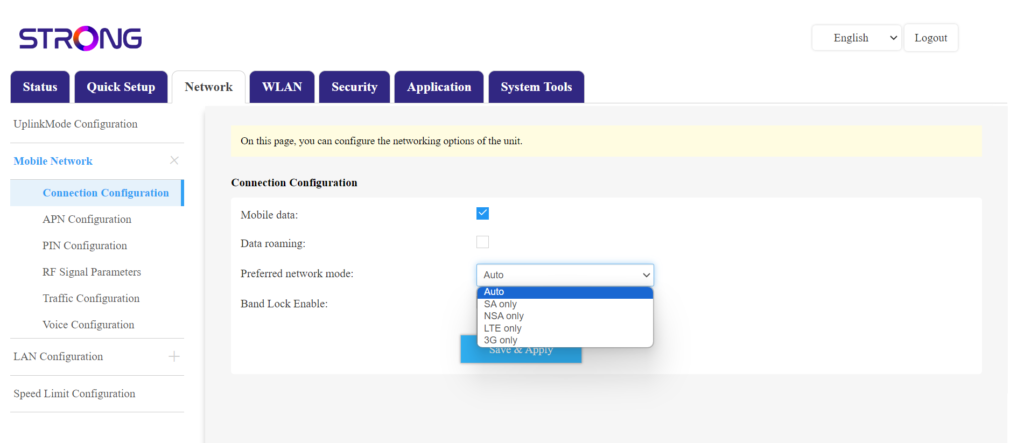
4. Ρυθμίσεις σύνδεσης
Κάντε κλικ στην επιλογή «Δίκτυο » και επιλέξτε «Ρυθμίσεις σύνδεσης».
Στη συνέχεια, στη λίστα προτιμώμενων δικτύων, επιλέξτε είτε NSA (για δίκτυο 5G) είτε LTE (για δίκτυο 4G). Αυτό θα αποτρέψει το δίκτυό σας από το να εναλλάσσεται μεταξύ των διαφορετικών τύπων δικτύων. Για να επιλέξετε το κατάλληλο δίκτυο, ανατρέξτε σε έναν χάρτη κάλυψης κεραίας της περιοχής σας, ώστε να δείτε ποιο είναι το καλύτερο διαθέσιμο δίκτυο.