
Δεν βρέθηκαν αντικείμενα.
Δεν βρέθηκαν αντικείμενα.
ΚΑΤΑΓΡΑΦΈΑΣ ΒΊΝΤΕΟ ΔΙΚΤΎΟΥ 12 ΚΑΝΑΛΙΏΝ
Όλες οι ερωτήσεις
Δεν βρέθηκαν αντικείμενα.
Δεν βρέθηκαν αντικείμενα.
ΚΑΤΑΓΡΑΦΈΑΣ ΒΊΝΤΕΟ ΔΙΚΤΎΟΥ 12 ΚΑΝΑΛΙΏΝ
Πώς να ρυθμίσω το NVR μου;
1. Περιμένετεμέχρι να εκκινήσει το σύστημα
Παρακαλώ περιμένετε κατά τη διάρκεια της εκκίνησης.
2Επιλέξτετη γλώσσα που προτιμάτε
Επιλέξτε τη γλώσσα και κάντε κλικ στο «Επόμενο».

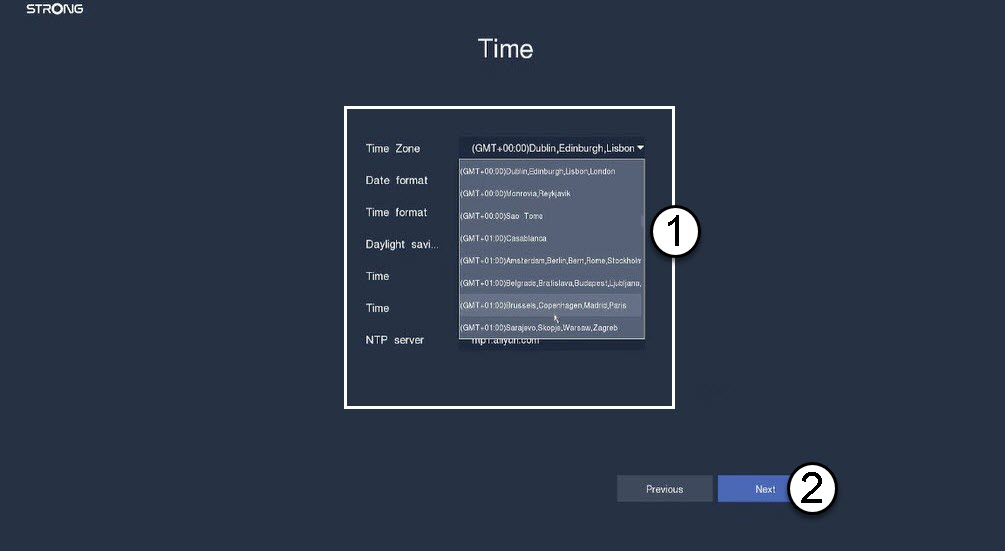
3. Ρύθμισητης ημερομηνίας, της ώρας και των παραμέτρων περιοχής
Εισάγετε τις παρακάτω πληροφορίες πριν κάνετε κλικ στο κουμπί «Επόμενο»:
- Ζώνη ώρας: Επιλέξτε τη ζώνη ώρας της χώρας ή της περιοχής σας.
- Μορφή ημερομηνίας: Επιλέξτε τη μορφή που χρησιμοποιείται στην περιοχή σας.
- Μορφή ώρας: Επιλέξτε τη μορφή που χρησιμοποιείται στην περιοχή σας.
- Θερινή ώρα: Ενεργοποιήστε αυτή τη λειτουργία μόνο αν έχετε διαφορετικές προεπιλεγμένες ζώνες ώρας το καλοκαίρι και το χειμώνα.
- Διακομιστής NTP: Εισάγετε τη διεύθυνση ενός διακομιστή χρόνου.
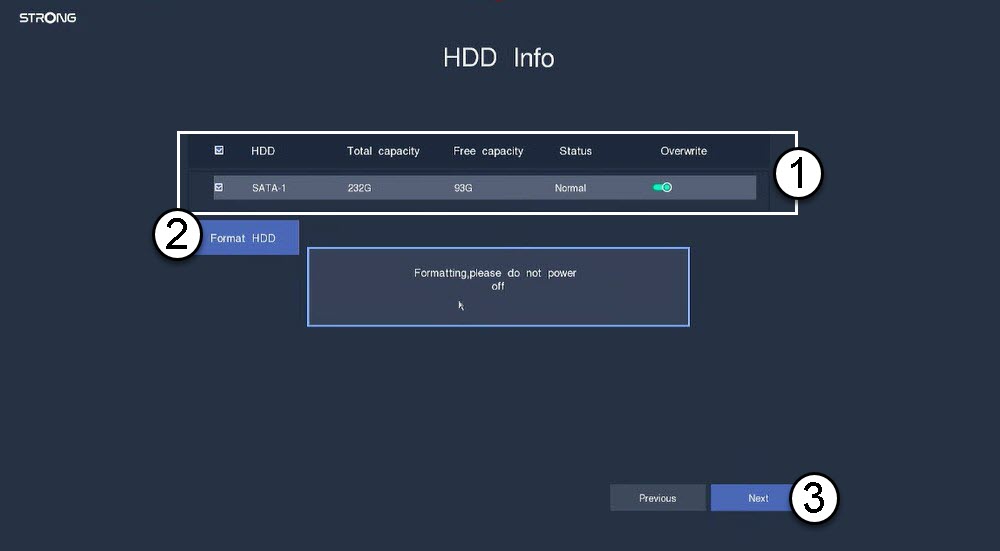
4. Διαμόρφωσητου σκληρού δίσκου σας
Παρακαλούμε να διαμορφώσετε τον σκληρό σας δίσκο επιλέγοντας το όνομά του από τη λίστα και κάντε κλικ στο «Διαμόρφωση σκληρού δίσκου». Στη συνέχεια , κάντε κλικ στο «Επόμενο».
5. Έλεγχοςτης σύνδεσης στο δίκτυο
Στην ενότητα «Δίκτυο», ελέγξτε τις πληροφορίες DHCP του LAN. Εάν η διεύθυνση DHCP είναι σωστή, η κατάσταση που εμφανίζεται είναι «Συνδεδεμένο». Κάντε κλικ στο κουμπί «Επόμενο».

6. Δημιουργίακωδικού πρόσβασης διαχειριστή
Όταν συνδέεστε για πρώτη φορά στο NVR, πρέπει να ρυθμίσετε τον κωδικό πρόσβασής του.
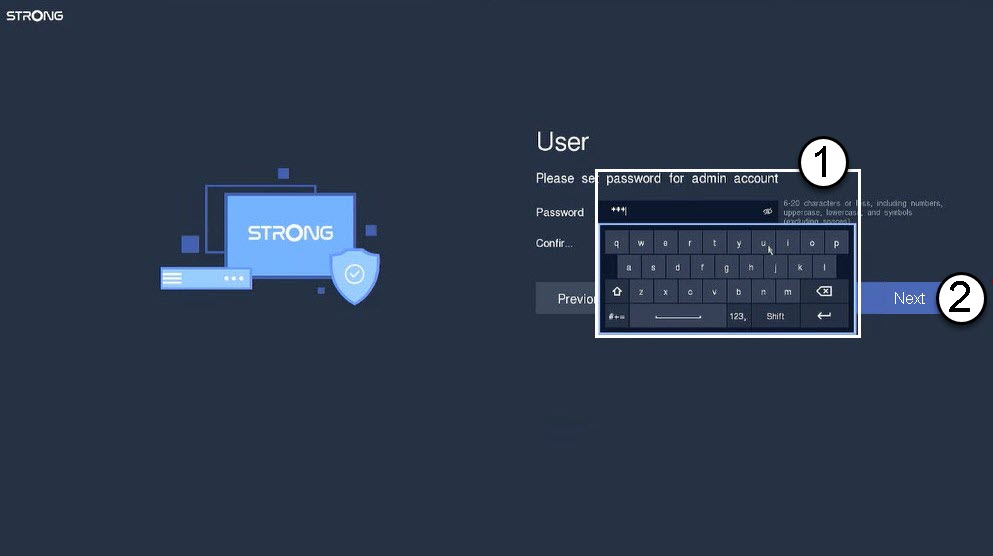

Προειδοποίηση: Σημειώστε τον κωδικό πρόσβασης που ορίσατε. Θα τον χρειαστείτε για να συνδεθείτε στο περιβάλλον χρήστη.