
Mesh Wi-Fi 5 Mesh ATRIA 2100 (add-on)
Todas las preguntas
Mesh Wi-Fi 5 Mesh ATRIA 2100 (add-on)
¿Cómo puedo cambiar el SSID (nombre de la red Wi-Fi) y la contraseña de mi red Wi-Fi mesh ?

Advertencia: Ten en cuenta que debes introducir una contraseña de entre 8 y 32 caracteres que contenga
mayúsculas, minúsculas, números y al menos un carácter especial (@, $, !, %, *, ?, &).
Para conectarte a la interfaz de usuario web, consulta este procedimiento: ¿Cómo puedo acceder a la interfaz de usuario web?
1CASO1: Cómo modificar la información de la red Wi-Fi en la interfaz de usuario web
Haz clic en «WLAN » y «WLAN 2,4 G». A continuación, introduce la siguiente información antes de hacer clic en «Confirmar»:
- SSID: Introduce un nuevo nombre de red
- PSK: Introduce una nueva contraseña.

2. Anotala nueva información
Anota la nueva información de red en un papel.

Para conectarte a la aplicación, consulta este procedimiento: ¿Cómo se utiliza la aplicación Atria « Mesh »?
1CASO2: Cómo cambiar la información de la red Wi-Fi en la aplicación
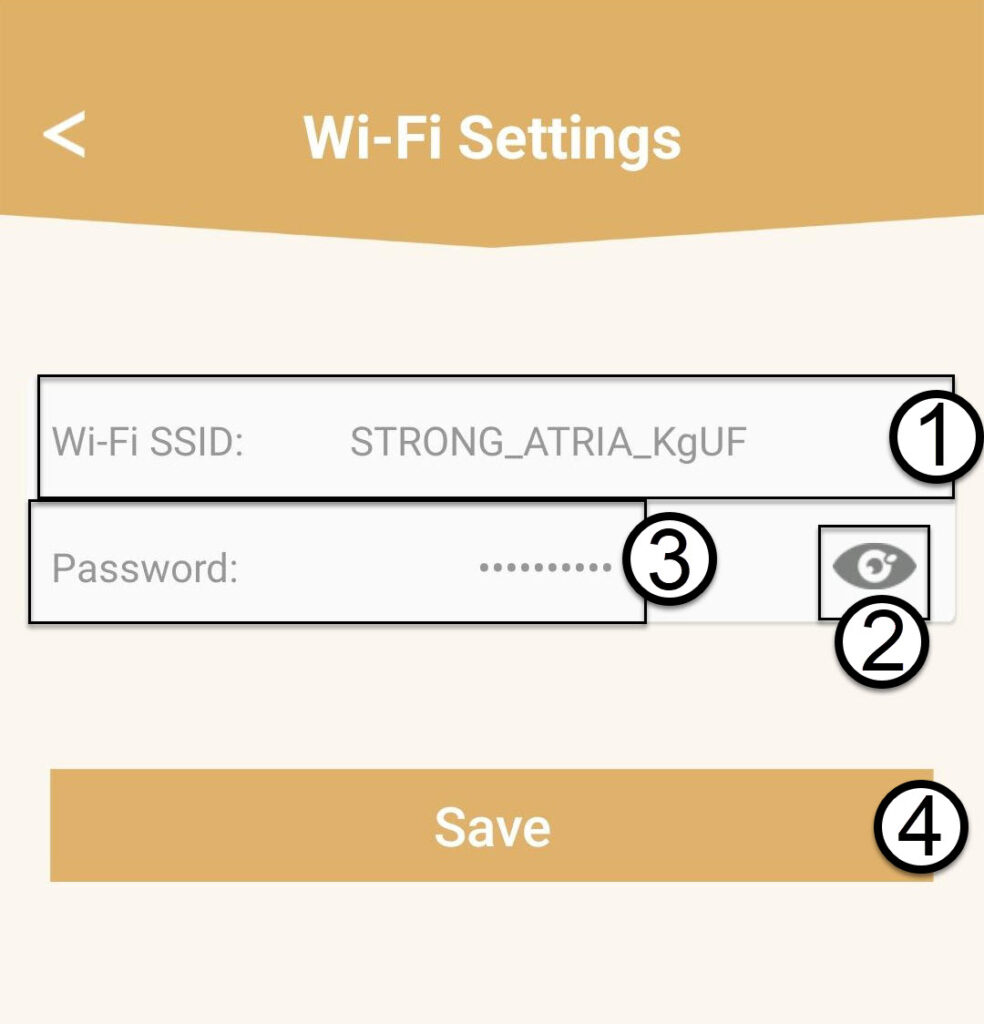
Haz clic en «Configuración de Wi-Fi».

2. Anotala nueva información
Introduce un nuevo SSID de Wi-Fi y haz clic en el icono del ojo para mostrar la contraseña y cámbiala antes de hacer clic en «Guardar».
3. Anotala nueva información
Anota la contraseña en un trozo de papel.