
Aucun élément n'a été trouvé.
Aucun élément n'a été trouvé.
CAMÉRA BÉBÉ DOVY
Toutes les questions
Aucun élément n'a été trouvé.
Aucun élément n'a été trouvé.
CAMÉRA BÉBÉ DOVY
L'appairage échoue / Le message « Connexion établie » ne s'affiche jamais
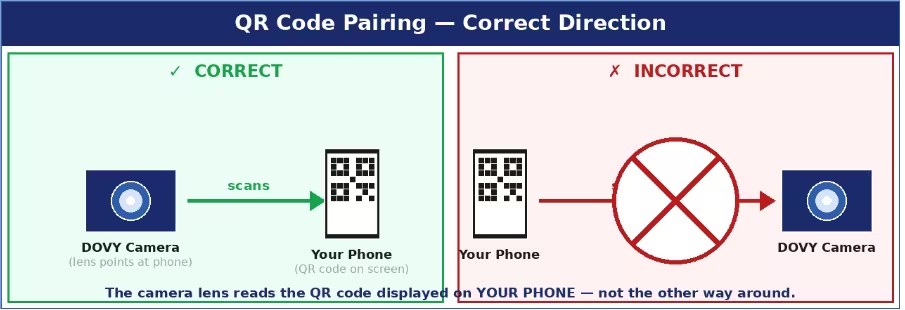
Les causes les plus courantes et leurs solutions :
- Le code QR n'est pas lu : augmentez au maximum la luminosité de l'écran de votre téléphone, placez l'objectif de l'Caméra e à une distance de 15 à 25 cm de l'écran et assurez-vous qu'aucun film de protection ne recouvre l'objectif. L'Caméra e doit être en mode appairage (la LED d'état clignote en rouge). Vous disposez de 2 minutes après la réinitialisation (RESET) ; si le délai est écoulé, répétez la réinitialisation et réessayez.
- Bande Wi-Fi incorrecte : vous devez sélectionner un réseau à 2,4 GHz. Si votre routeur utilise un SSID combiné (même nom pour les bandes 2,4 GHz et 5 GHz), renommez temporairement l'une des bandes dans les paramètres de votre routeur afin de les distinguer.
- Le SSID ou le mot de passe est trop long : ils doivent tous deux comporter 24 caractères au maximum. Raccourcissez-les dans les paramètres de votre routeur si nécessaire.
- Autorisations manquantes : assurez-vous que le Bluetooth et la localisation sont activés sur votre téléphone pendant le couplage.
- Caméra Si l'appareil n'est pas en mode d'appairage : maintenez la touche RESET enfoncée pendant 5 secondes complètes jusqu'à ce que la LED clignote lentement en rouge. Si la LED est allumée en bleu fixe, cela signifie que l'Caméra est déjà connectée — appuyez à nouveau sur RESET pour forcer le passage en mode d'appairage.
Conseils : veillez à ce que l'Caméra e et votre téléphone se trouvent à une distance de 1 à 2 mètres du routeur Wi-Fi pendant toute la durée de la procédure d'appairage.