
Dvopojasni repetitor 1200
Nema pronađenih stavki.
Nema pronađenih stavki.
Sva pitanja
Dvopojasni repetitor 1200
Nema pronađenih stavki.
Nema pronađenih stavki.
Kako konfigurirati repetitor kao pristupnu točku?
SAVJETI: Prije konfiguriranja repetitora, provjerite sljedeći postupak kako biste odredili lokaciju repetitora:
Koja je najbolja lokacija za moj repetitor?1. Spojite se na web-sučelje.
Za povezivanje s web-sučeljem slijedite jedan od dolje navedenih postupaka:
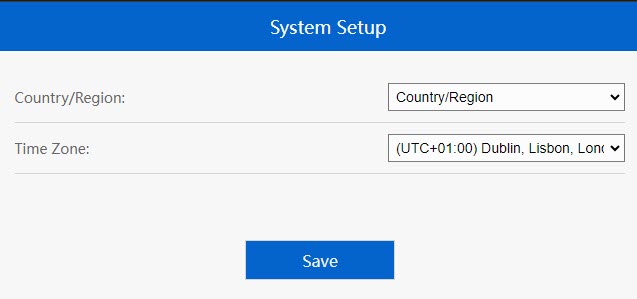
2. Postavite vremensku zonu
Odaberite vremensku zonu s popisa ako je ona koja se automatski prepoznaje netočna i kliknite Spremi .
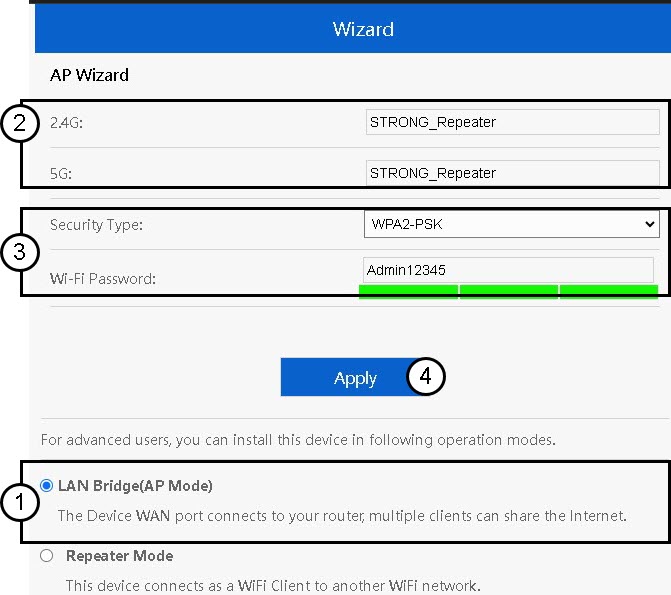
3. Konfigurirajte postavke pristupne točke
Otvorit će se čarobnjak za postavljanje repetitora. Odaberite LAN most (AP). Zatim unesite naziv za pristupne točke. Odaberite vrstu sigurnosti i unesite Wi-Fi lozinku prije nego što kliknete Primijeni.
4 Pričekajte konfiguraciju repetitora
Pričekajte nekoliko trenutaka dok repetitor dovrši postupak konfiguracije.
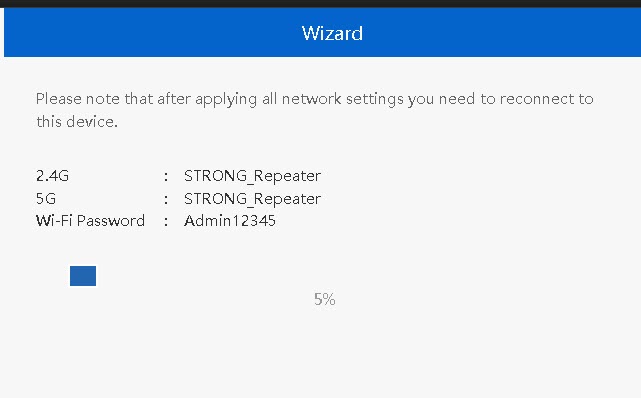

Upozorenje: Molimo zapišite podatke za dvije Wi-Fi mreže. Trebat će vam ti podaci za povezivanje s mrežom.