
4G+ AIRSPOT 510 Mobilni Wi-Fi
Nema pronađenih stavki.
Nema pronađenih stavki.
Sva pitanja
4G+ AIRSPOT 510 Mobilni Wi-Fi
Nema pronađenih stavki.
Nema pronađenih stavki.
Kako mogu upravljati postavkama APN-a svog uređaja?
Ponekad se mogu pojaviti problemi s mobilnom podatkovnom mrežom nakon konfiguriranja uređaja i unosa PIN koda. U tom slučaju slijedite dolje navedeni postupak za provjeru podataka o APN-u.
1 Pristup web sučelju
Za povezivanje s web-sučeljem slijedite ovaj postupak. Kako pristupiti web-sučelju?
2 Otvorite konfiguraciju APN-a
Kliknite Internetske postavke i Konfiguracija APN-a . Zatim kliknite Dodaj APN.
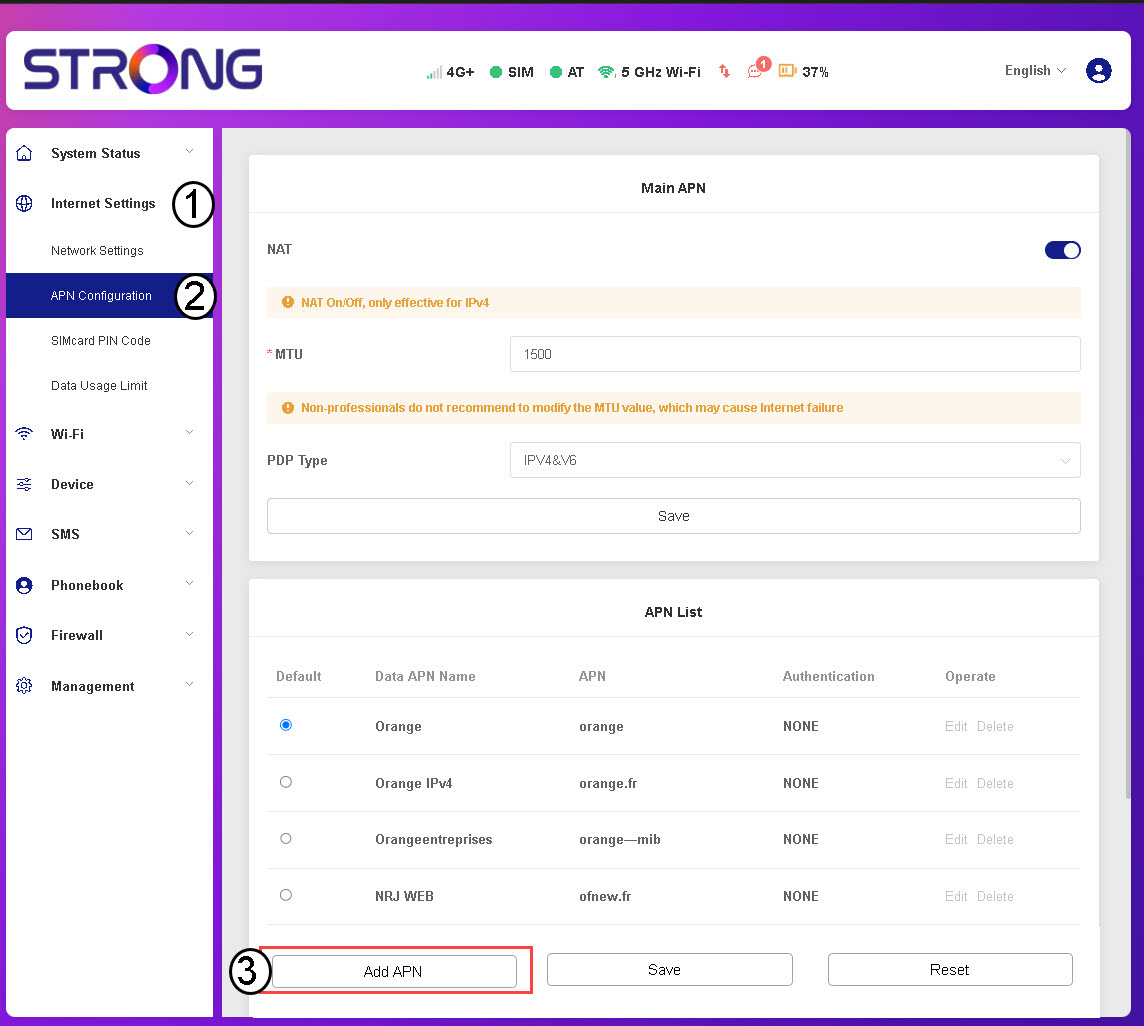
3. Unesite i spremite podatke o APN-u
Prije nego što kliknete Spremi, unesite sljedeće podatke:
- Naziv APN-a za podatke: Unesite naziv APN-a koji vam je dao vaš davatelj usluga.
- APN: Unesite APN koji vam je dao vaš davatelj usluga.
- Autentifikacija: Odaberite vrstu autentifikacije s popisa na temelju informacija koje vam je dao vaš davatelj usluga.