
Router 4G AIRHOME 200 Mini con antenne 4G rimovibili
Tutte le domande
Router 4G AIRHOME 200 Mini con antenne 4G rimovibili
Come posso controllare e modificare le impostazioni APN del mio operatore?
Se la scheda SIM non viene riconosciuta automaticamente dal dispositivo, è necessario accedere all'interfaccia utente web per verificare le impostazioni APN e modificarle, se necessario. Le impostazioni APN del proprio operatore sono disponibili direttamente sul suo sito web all'indirizzo
oppure è possibile richiederle al servizio di assistenza del proprio operatore.
1. Connettitialla rete Wi-Fi del tuo router
È necessario connettersi all'interfaccia utente web. A tal fine, inserire nel dispositivo l'SSID (nome della rete Wi-Fi) e la password Wi-Fi del router.

2. Accedereall'indirizzo IP dell'interfaccia utente web
A questo punto, inserisci nel browser il seguente indirizzo IP: 192.168.188.1

3. Inseriscile tue credenziali
È necessario inserire la password. Quindi, fare clic su " Accedi".

4 Impostazioni di rete
Fai clic su " Impostazioni di rete".

5. Verificale informazioni relative all'APN del tuo operatore
Cerca le impostazioni APN sul sito web del tuo operatore. Devi annotare le seguenti informazioni:
- Nome
- APN
- Nome utente
- Password
- Autenticazione
6. Creareun APN manuale
Se le informazioni non sono corrette, fare clic su APN, quindi su " Manuale " e infine su " Aggiungi nuovo".
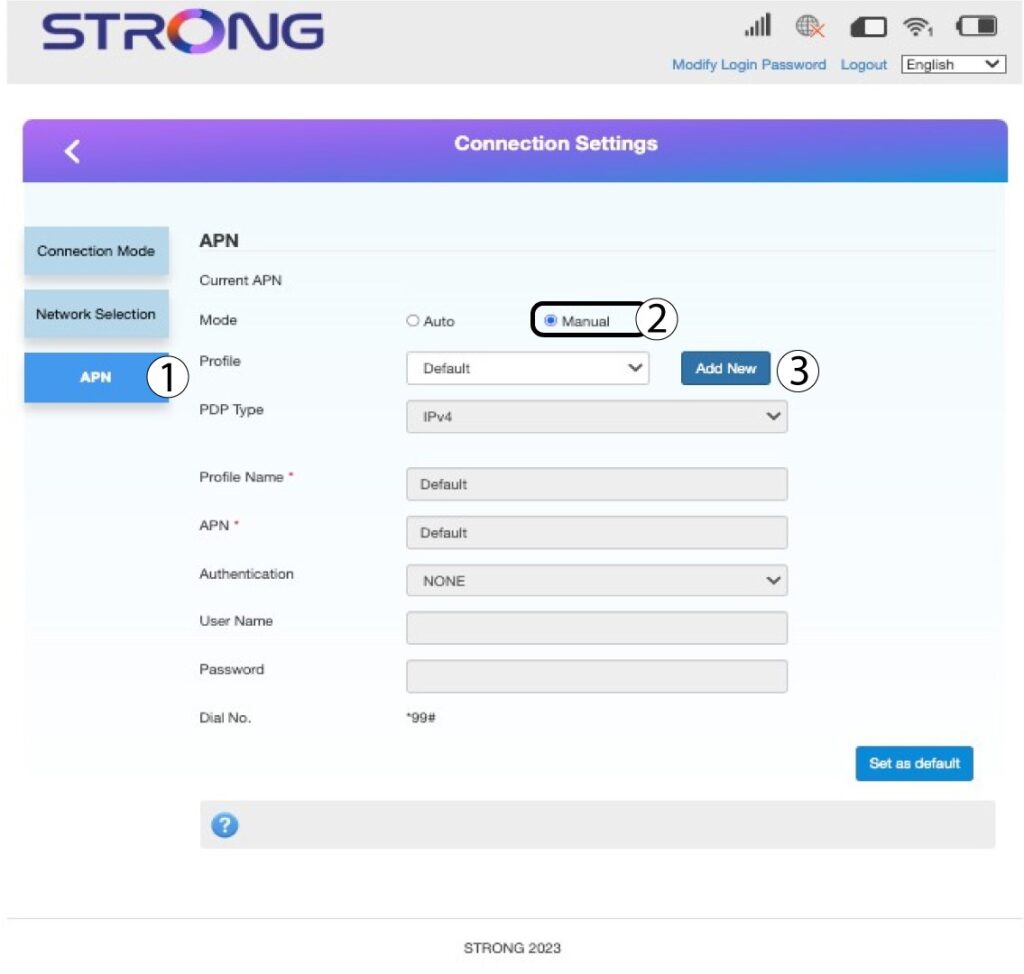
7. Inseriscile informazioni relative all'APN
Inserisci le seguenti informazioni prima di fare clic su " Imposta come predefinito":
- Tipo di PDP: selezionare IPv4 come valore per il tipo di PDP.
- Nome profilo: inserisci il nome del tuo fornitore di servizi.
- APN: inserire l'indirizzo APN.
- Tipo di autenticazione: selezionare il tipo di autenticazione definito dal proprio provider per l'APN tra i seguenti valori (NESSUNO, CHAP, PAP)
