
Powerline 1000 Duo Wi-Fi FR V2
Alle vragen
Powerline 1000 Duo Wi-Fi FR V2
Kan ik de wifi-functie van de wifi-module uitschakelen, zodat deze als een gewone Powerline werkt?
Ja, het is mogelijk om de wifi uit te schakelen. Volg hiervoor de onderstaande stappen.
1Maak verbindingmet het wifi-netwerk ‘ powerline ’
Maak verbinding met het wifi-netwerk van de Powerline.
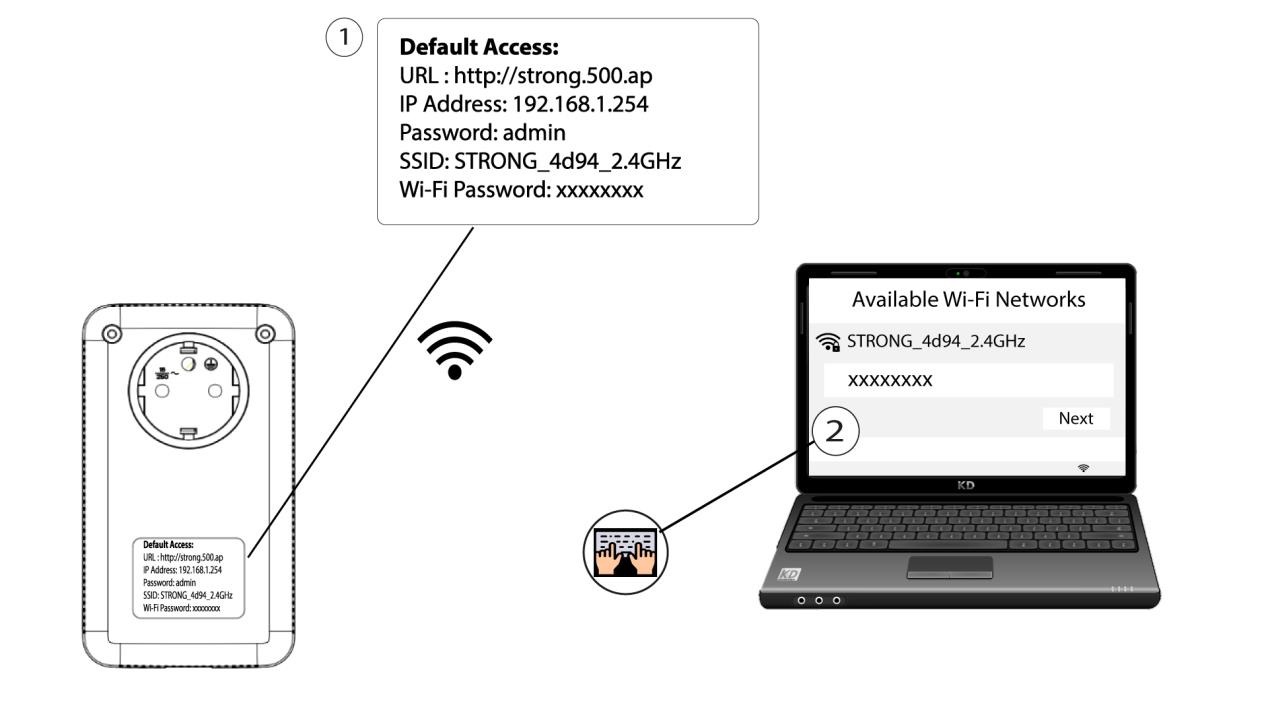
2. Ganaar het IP-adres van de webinterface
Maak verbinding met de gebruikersinterface van de Wi-Fi-module Powerline via Wi-Fi of door http://strong.500.ap in de adresbalk van je internetbrowser in te voeren; de interface zou dan moeten verschijnen.

3. Voerde inloggegevens in
Voer op de startpagina het wachtwoord in: admin

4. WLAN-instellingen
Klik op ‘WLAN-instellingen ’ en selecteer vervolgens ‘Basisinstellingen’.

5. Schakelde wifi uit
Schakel het selectievakje 'Inschakelen' bij de regel 'Draadloos' uit, afhankelijk van uw behoeften, en klik op 'Opslaan'.


Houd er rekening mee dat u, om de wifi via de gebruikersinterface van de module opnieuw te activeren, verbinding moet maken via een RJ45-kabel. Een andere manier om de wifi opnieuw te activeren is door de wifi van de Powerline te resetten met behulp van een paperclip, totdat de LED’s gaan knipperen. Alle apparaten die verbonden waren met het wifi-netwerk powerline worden automatisch losgekoppeld.