
Dubbelband-repeater 1200
Geen items gevonden.
Geen items gevonden.
Alle vragen
Dubbelband-repeater 1200
Geen items gevonden.
Geen items gevonden.
Hoe stel ik mijn repeater in als toegangspunt?
TIPS: Controleer, voordat u uw repeater configureert, de volgende procedure om de locatie van uw repeater te bepalen:
Wat is de beste plek voor mijn repeater?1. Maak verbindingmet de web-UI.
Volg een van de onderstaande procedures om verbinding te maken met de webinterface:
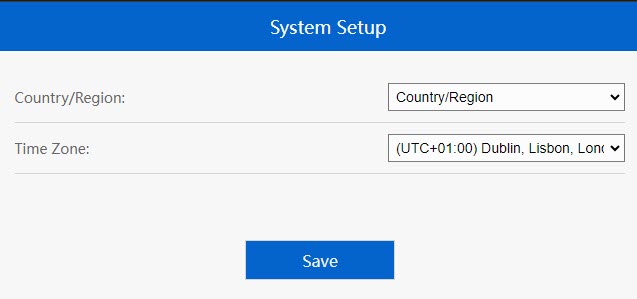
2. De tijdzone instellen
Selecteer de tijdzone uit de lijst als de automatisch gedetecteerde tijdzone onjuist is en klik op ‘Opslaan’.
3. De instellingen van het toegangspunt configureren
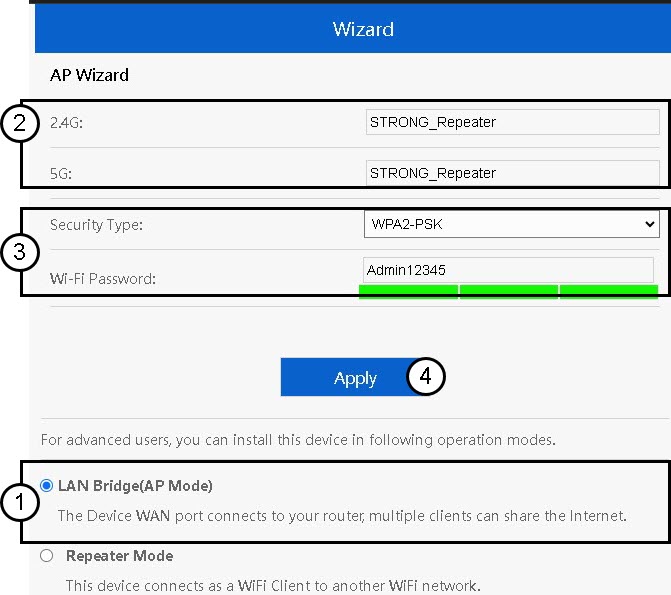
De installatiewizard voor de repeater wordt geopend. Selecteer‘LAN-bridge (AP)’. Voer vervolgens de naam voor de access points in. Selecteer een beveiligingstype en voer een wifi-wachtwoord in voordat u op ‘Toepassen’ klikt.
4Wachttot de configuratie van de repeater is voltooid
Wacht alstublieft even terwijl de repeater het configuratieproces voltooit.
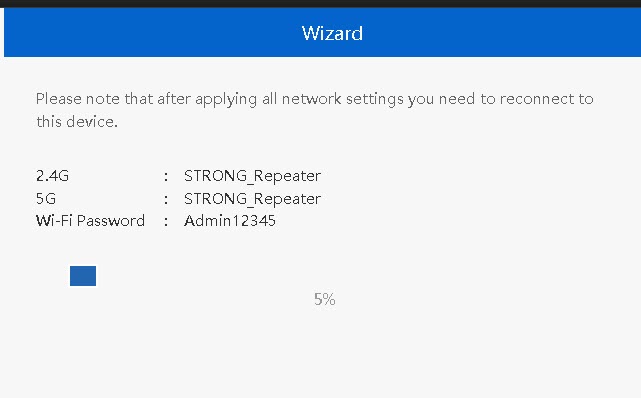

Waarschuwing: Noteer de gegevens van de twee wifi-netwerken. Je hebt deze gegevens nodig om verbinding te maken met het netwerk.