ATRIA Wi-Fi 6 Mesh 3000 (2-pack)
Alle vragen
ATRIA Wi-Fi 6 Mesh 3000 (2-pack)
Waarvoor worden de verschillende poorten gebruikt?
1Maak verbindingmet het wifi-netwerk van het apparaat
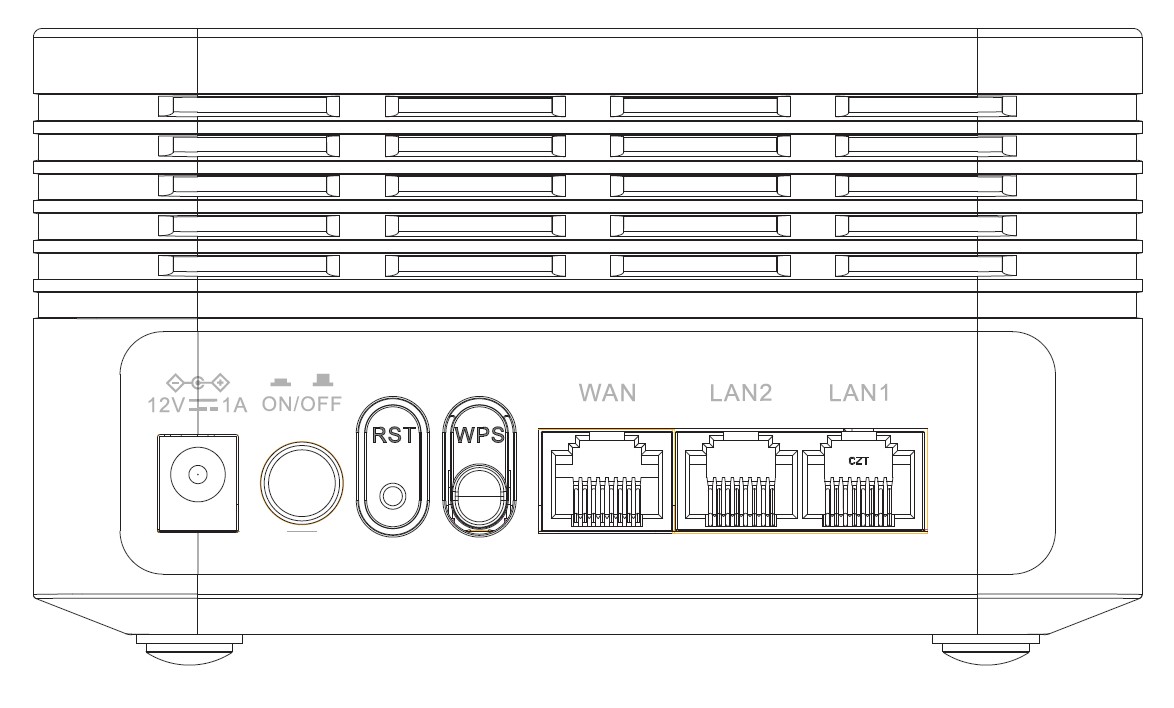
Er zitten 7 poorten aan de achterkant van je apparaat:
• 12V1A: Hier sluit je de voedingskabel aan.
• ON/OFF: Je kunt je apparaat in- of uitschakelen door simpelweg op deze knop te drukken.
• RST: Wordt gebruikt om je apparaat terug te zetten naar de fabrieksinstellingen door er een paperclip in te steken.
• WPS: De WPS-knop wordt gebruikt om verschillende apparaten met elkaar te koppelen.
• WAN: De WAN-poort voor een RJ45-kabel om het apparaat aan te sluiten op uw internetmodem.
• LAN2: Wordt gebruikt om een van uw persoonlijke apparaten via RJ45 aan te sluiten op het Mesh om een constante verbinding te garanderen.
• LAN1: Wordt gebruikt om een van uw persoonlijke apparaten via RJ45 aan te sluiten op het Mesh om een constante verbinding te garanderen.