5G AIRHOME 1050 | Wi-Fi 6
Alle spørsmål
5G AIRHOME 1050 | Wi-Fi 6
Hvordan velger jeg nettverkstype?

Ruteren din har ett Wi-Fi-nettverk og to mobildatanettverk, enten i 4G eller 5G. Du trenger først ett SIM-kort for å aktivere mobilnettverkene.
1 Koble til enheten
For å få tilgang til nettverkstypene må du koble til nettgrensesnittet. For å gjøre dette, skriv inn SSID (Wi-Fi-nettverksnavn) og Wi-Fi-passordet til ruteren på enheten din:

2 Tilgang til nettgrensesnittet
Deretter skriver du inn følgende IP-adresse i nettleseren din: 192.168.0.1.

3 Logg inn
Du må oppgi brukernavnet og deretter klikke på Logg inn . For mer informasjon om pålogginger, se påloggingsprosedyren.

4 Tilkoblingskonfigurasjon
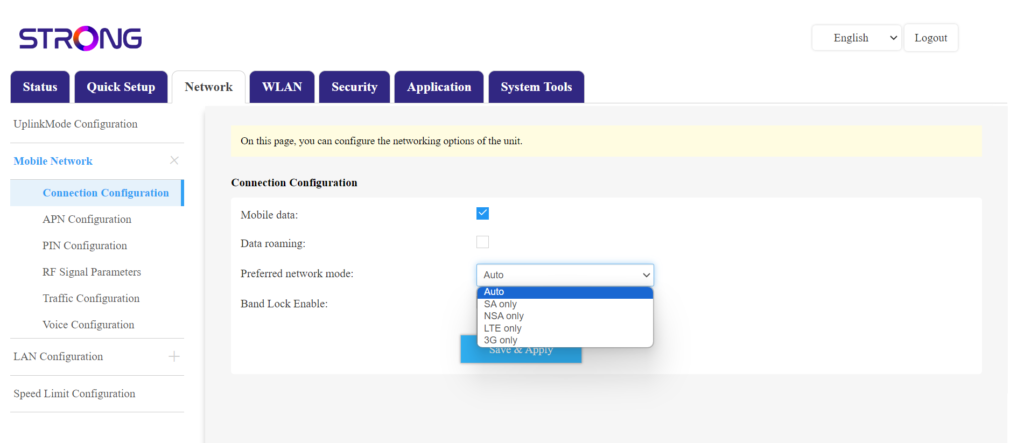
Klikk på Nettverk og velg Tilkoblingskonfigurasjon.
I listen over foretrukne nettverk velger du deretter enten NSA for (5G-nettverk) eller LTE (for 4G-nettverk). Dette vil forhindre at nettverket ditt bytter mellom de ulike nettverkstypene. For å velge riktig nettverk, finn et kart over antennedekningen der du befinner deg for å se hva som er det beste tilgjengelige nettverket.