5G AIRHOME 1050 | Wi-Fi 6
Wszystkie pytania
5G AIRHOME 1050 | Wi-Fi 6
Jak wybrać typ sieci?

Twój router obsługuje jedną sieć Wi-Fi oraz dwie sieci komórkowe – 4G lub 5G. Aby aktywować sieci komórkowe, musisz najpierw włożyć jedną kartę SIM.
1. Podłączurządzenie
Aby uzyskać dostęp do typów sieci, należy połączyć się z interfejsem użytkownika (Web UI). W tym celu należy wprowadzić w urządzeniu identyfikator SSID (nazwę sieci Wi-Fi) oraz hasło Wi-Fi routera:

2. Dostępdo interfejsu użytkownika w sieci WWW
Następnie wpisz w przeglądarce następujący adres IP: 192.168.0.1.

3Zalogujsię
Należy wpisać nazwę użytkownika, a następnie kliknąć przycisk „Zaloguj się”. Więcej informacji na temat logowania można znaleźć w instrukcji logowania.

4. Konfiguracja połączenia
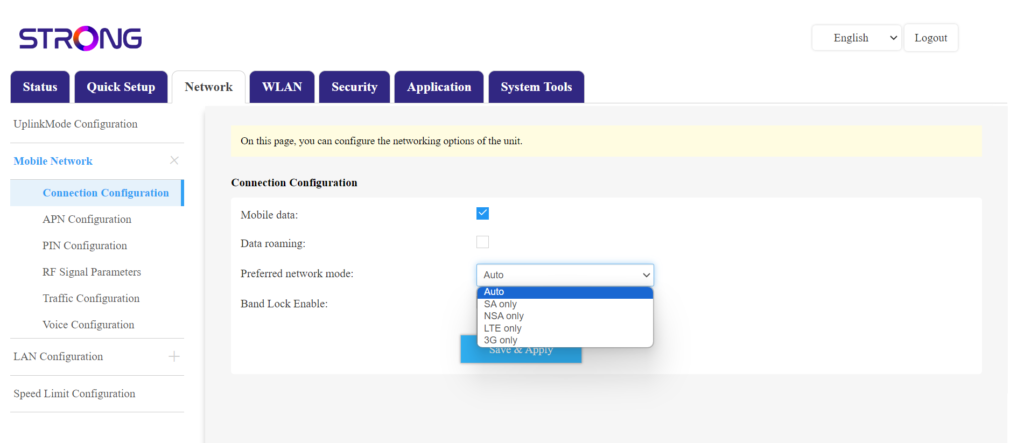
Kliknij opcję „Sieć ” i wybierz „Konfiguracja połączenia”.
Następnie na liście preferowanych sieci wybierz opcję „NSA” (dla sieci 5G) lub „LTE” (dla sieci 4G) – zapobiegnie to przełączaniu się sieci między różnymi typami sieci. Aby wybrać odpowiednią sieć, zapoznaj się z mapą zasięgu antenowego w Twojej lokalizacji, aby sprawdzić, która sieć jest najlepsza.