
Powerline 1000 Duo Wi-Fi FR V2
Všetky otázky
Powerline 1000 Duo Wi-Fi FR V2
Ako môžem zmeniť názov SSID a heslo Wi-Fi siete zariadenia Powerline 1000?
1. Pripojtesa k sieti Wi-Fi „ powerline “
Pripojte sa k sieti Wi-Fi zariadenia „ Powerline 1000“.
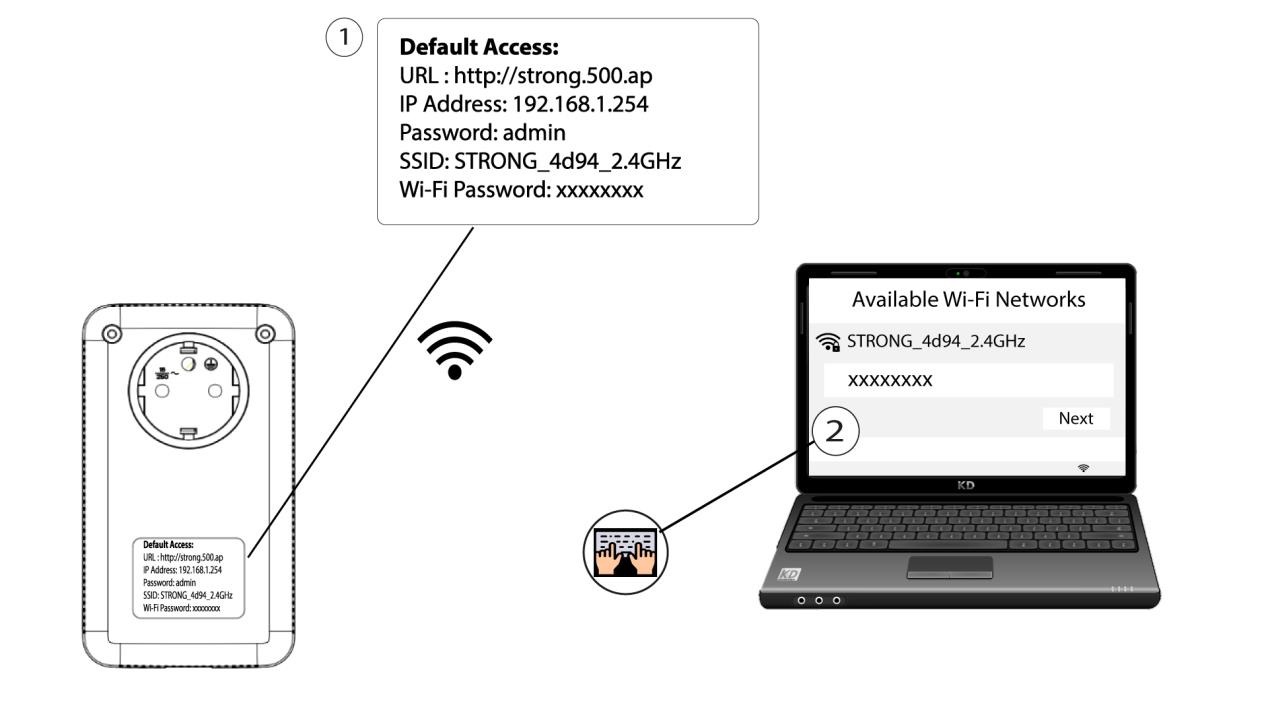
2Prejditena IP adresu webového rozhrania
Do používateľského rozhrania sa dostanete tak, že do adresného riadka svojho internetového prehliadača zadáte adresu: http://strong.500.ap.

3Zadajteprihlasovacie údaje
Potom zadajte heslo: admin

4Rýchlenastavenie
Prejdite do ponuky, vyberte mož nosť Rýchle nastavenie, potom kliknite na Prístupový bod (AP) a kliknite na ĎALEJ.

5Zadajtenové informácie o sieti
Upravte SSID a prístupovú frázu. Pri vytváraní novej prístupovej frázy sa prosím vyhnite používaniu veľkého písmena „I“ a malého písmena „l“, pretože sa dajú ľahko zameniť. Odporúčame vám tiež vytvoriť prístupovú frázu, ktorá sa skladá zo striedajúcich sa veľkých písmen, malých písmen a číslic. Po dokončení úprav kliknite na tlačidlo „ĎALEJ“ na uloženie.

6. Zapíštesi nové sieťové údaje
Zapíšte si prosím nové SSID a prístupovú frázu na papier a potom všetky svoje zariadenia opäť pripojte k Wi-Fi sieti „ powerline 1000“ pomocou nových nastavení.
