ATRIA Wi-Fi 6 Mesh 3000 UK 2-balenie)
Nenašli sa žiadne položky.
Nenašli sa žiadne položky.
Všetky otázky
ATRIA Wi-Fi 6 Mesh 3000 UK 2-balenie)
Nenašli sa žiadne položky.
Nenašli sa žiadne položky.
Na čo slúžia jednotlivé porty?
1. Pripojte sak Wi-Fi sieti zariadenia
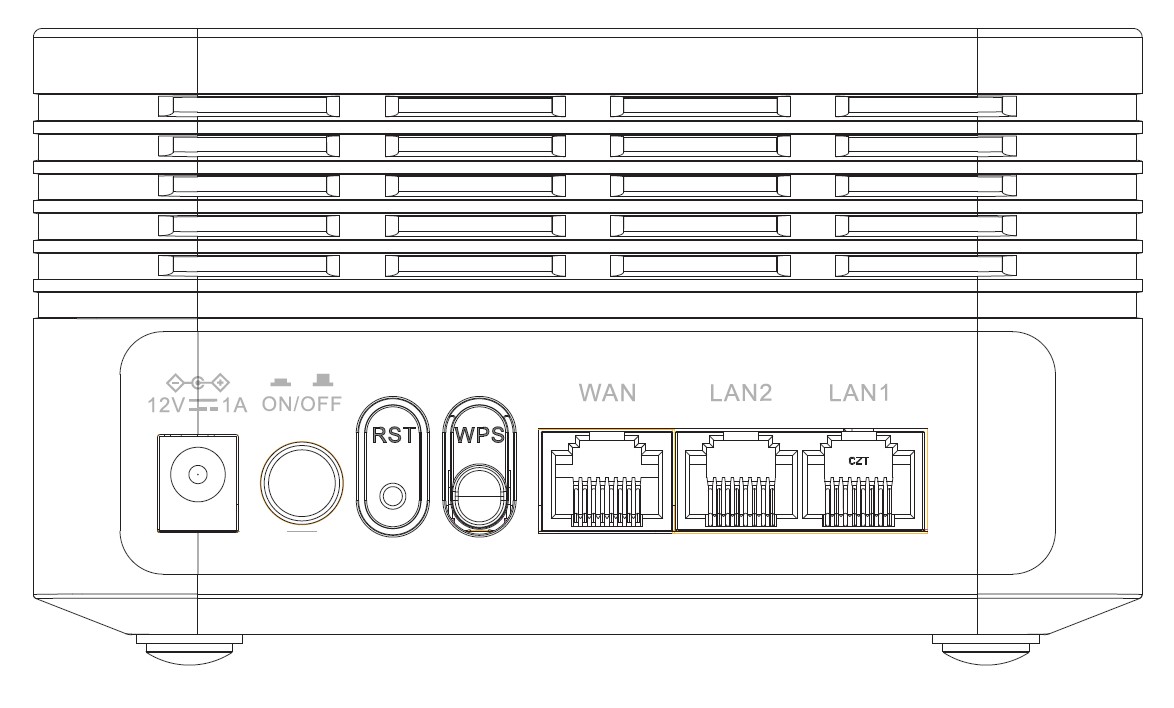
Na zadnej strane vášho zariadenia sa nachádza 7 portov:
• 12V1A: Sem sa zapája napájací kábel.
• ON/OFF: Týmto tlačidlom môžete zariadenie zapnúť alebo vypnúť.
• RST: Slúži na obnovenie továrenských nastavení zariadenia vložením kancelárskej sponky do otvoru.
• WPS: Tlačidlo WPS slúži na spárovanie rôznych zariadení.
• WAN: Port WAN pre kábel RJ45 na pripojenie k internetu box.
• LAN2: Slúži na pripojenie jedného z vašich osobných zariadení k Mesh prostredníctvom konektora RJ45, čím sa zabezpečí stabilné pripojenie.
• LAN1: Slúži na pripojenie jedného z vašich osobných zariadení k Mesh prostredníctvom konektora RJ45, čím sa zabezpečí stabilné pripojenie.