
АТРИА Ви-Фи 5 Mesh Систем 2100 (пакет од 2 комада)
Сва питања
АТРИА Ви-Фи 5 Mesh Систем 2100 (пакет од 2 комада)
Како да променим SSID (назив Wi-Fi мреже) и лозинку моје Wi-Fi мреже mesh мрежа?

Упозорење : Имајте у виду да је потребно да унесете лозинку дужине између 8 и 32 карактера која садржи
велика слова, мала слова, број и бар један специјални знак (@, $, !, %, *, ?, &)
Да бисте се повезали са веб корисничким интерфејсом, погледајте ову процедуру: Како да приступим веб корисничком интерфејсу?
1 СЛУЧАЈ 1: Промена информација о Wi-Fi мрежи у веб интерфејсу
Кликните на WLAN и WLAN 2.4G. Затим унесите следеће информације пре него што кликнете на Потврди :
- SSID: Унесите ново име мреже
- ПСК: Унесите нову лозинку.

2 Запишите нове информације
Запишите нове информације о мрежи на комад папира.

Да бисте се повезали са апликацијом, погледајте ову процедуру: Како да користим апликацију Atria Mesh ?
1 СЛУЧАЈ 2: Промена информација о Wi-Fi мрежи у апликацији
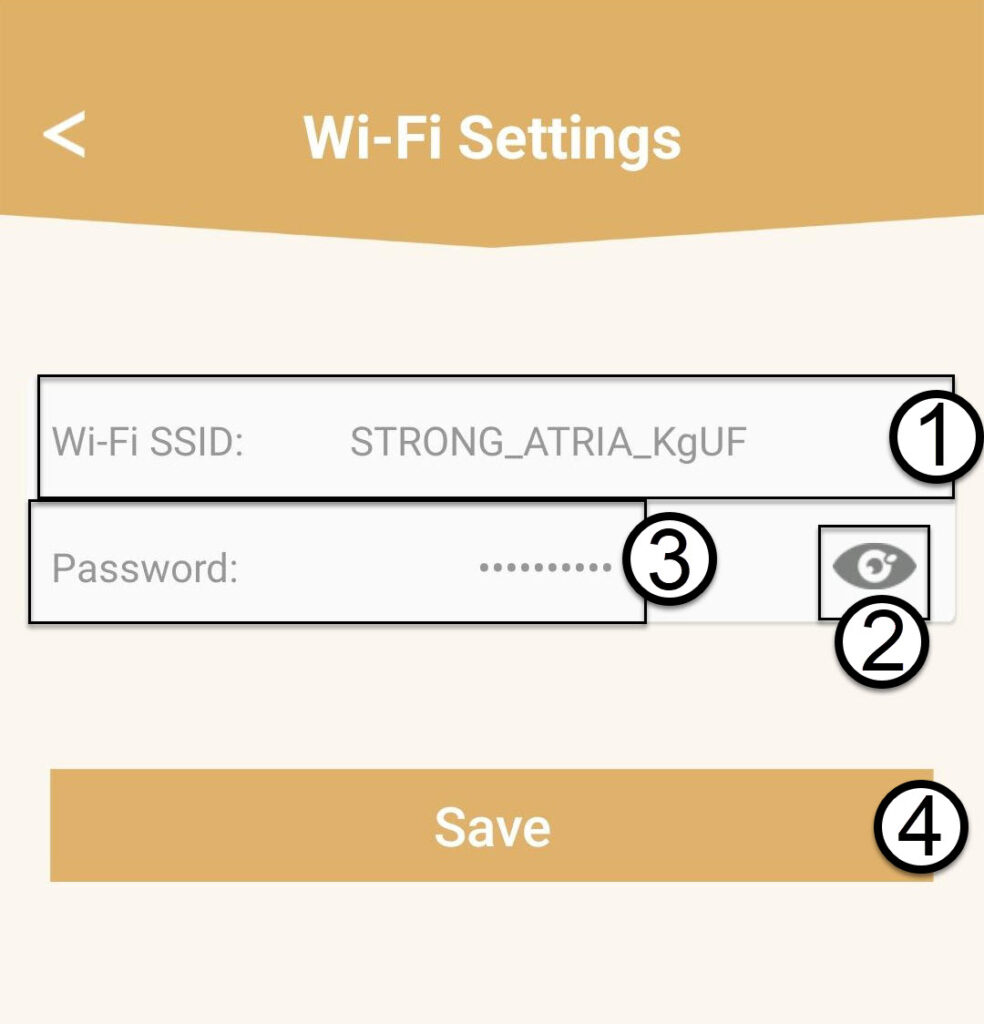
Кликните на Подешавања Wi-Fi мреже .

2 Запишите нове информације
Унесите нови SSID Wi-Fi мреже и кликните на икону ока да бисте приказали лозинку и промените лозинку пре него што кликнете на Сачувај .
3 Запишите нове информације
Запишите лозинку на комад папира.