5G AIRHOME 1050 | Wi-Fi 6
Сва питања
5G AIRHOME 1050 | Wi-Fi 6
Како да изаберем тип мреже?

Ваш рутер има једну Wi-Fi мрежу и две мобилне мреже за пренос података, било у 4G или 5G. Прво вам је потребна једна SIM картица да бисте активирали мобилне мреже.
1 Повежите се са уређајем
Да бисте приступили типовима мрежа, морате се повезати са веб интерфејсом. Да бисте то урадили, унесите SSID (назив Wi-Fi мреже) и лозинку за Wi-Fi рутер у свој уређај:

2 Приступ веб интерфејсу
Затим, унесите следећу ИП адресу у ваш прегледач: 192.168.0.1.

3 Пријава
Морате унети корисничко име , а затим кликнути на Пријава . За више информација о пријавама погледајте поступак пријаве.

4 Конфигурација везе
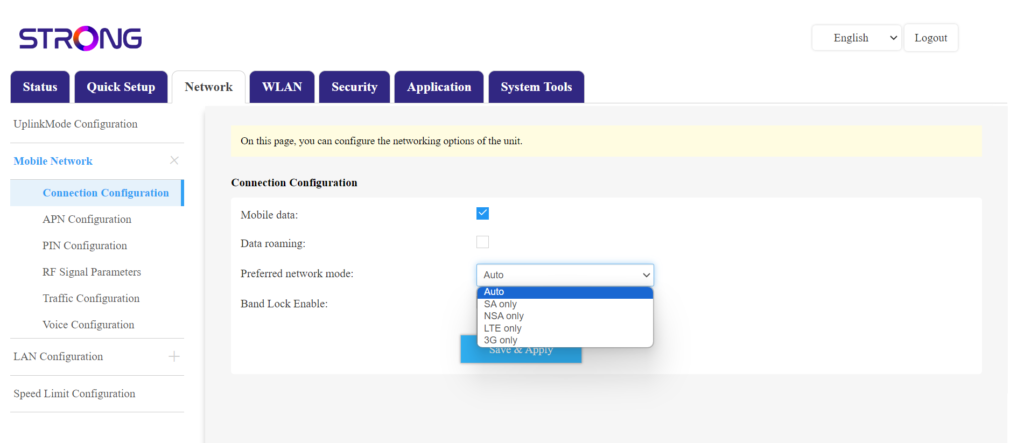
Кликните на Мрежа и изаберите Конфигурација везе.
Затим, на листи жељених мрежа изаберите NSA за (5G мрежа) или LTE (за 4G мрежа). Ово ће спречити да ваша мрежа прелази између различитих типова мрежа. Да бисте изабрали одговарајућу мрежу, пронађите мапу покривености антене ваше локације како бисте видели која је најбоља доступна мрежа.