
4G+ AIRSPOT 510 Wi-Fi рутер
Не са намерени никакви елементи.
Не са намерени никакви елементи.
Всички въпроси
4G+ AIRSPOT 510 Wi-Fi рутер
Не са намерени никакви елементи.
Не са намерени никакви елементи.
Как да променя паролата за администратора?
1. Отворетеуеб интерфейса
За да получите достъп до уеб интерфейса, моля, вижте „Как да получа достъп до уеб интерфейса?“
2. Преминетекъм „Настройки на паролата“
В раздела „Управление “ кликнете върху „Системни настройки “ и „Промяна на паролата“.
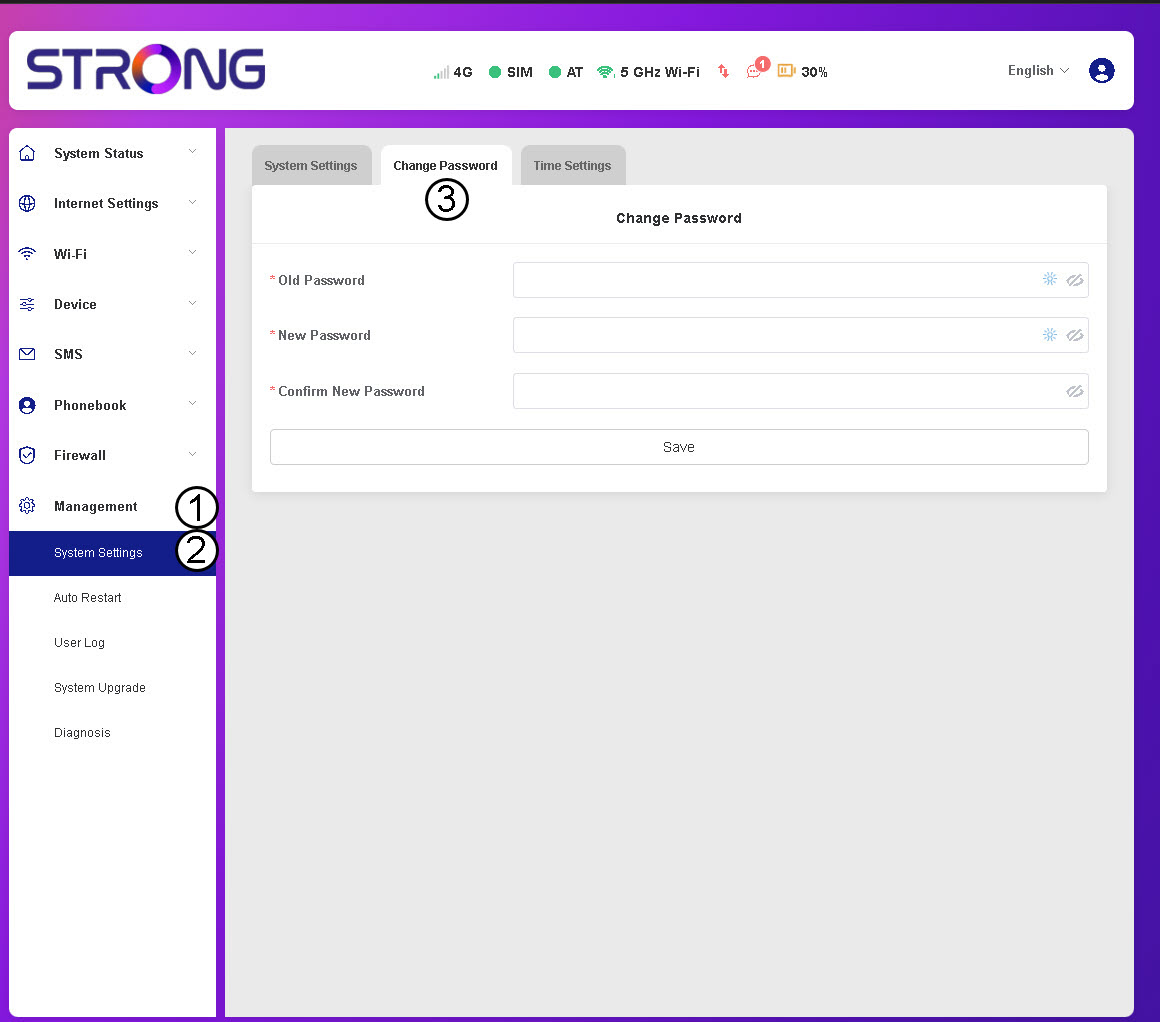
3Въведетеданните за паролата
След това въведете следната информация, преди да кликнете върху „Запази“:
- Стара парола: Въведете настоящата си парола.
- Нова парола: Въведете парола, състояща се от най-малко 8 символа и включваща комбинация от главни и малки букви, цифри и специални символи. Допускат се само следните специални символи: @$%*&.
- Потвърдете новата парола: Въведете същата парола, както в предходното поле.


ВНИМАНИЕ: Ако сте забравили текущата си парола, ще трябва да възстановите фабричните настройки на устройството.