
4G+ AIRSPOT 510 Wi-Fi рутер
Не са намерени никакви елементи.
Не са намерени никакви елементи.
Всички въпроси
4G+ AIRSPOT 510 Wi-Fi рутер
Не са намерени никакви елементи.
Не са намерени никакви елементи.
Как да деактивирам ПИН кода си?
След като поставите SIM-картата си и въведете ПИН-кода чрез LCD-екрана на Mi-Fi устройството, ПИН-кодът автоматично се деактивира.
Можете да проверите дали ПИН кодът е деактивиран, като изпълните следните стъпки:
1. Отворетеуеб интерфейса
Свържете се с уеб интерфейса.
2. Отворетенастройките за PIN кода на SIM картата
Кликнете върху „Настройки на интернет“, след което изберете „PIN код на SIM картата“.
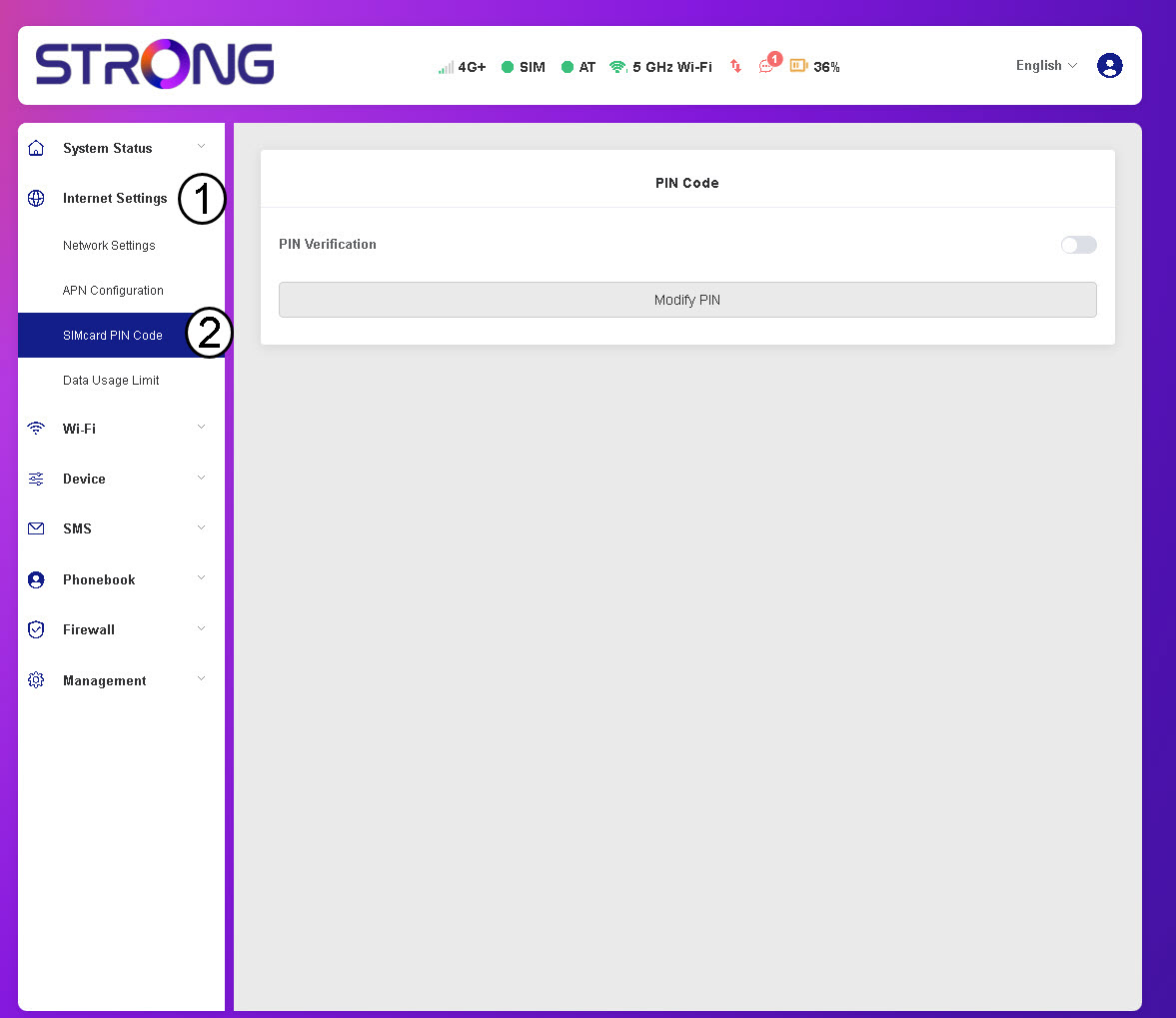
3. Проверкана състоянието на ПИН-кода
Уверете се, че превключвателят за PIN-верификация е сив, което показва, че PIN-кодът е деактивиран.
