
ATRIA Wi-Fi 5 Mesh 2100 (add-on)
Ingen varer fundet.
Ingen varer fundet.
Alle spørgsmål
ATRIA Wi-Fi 5 Mesh 2100 (add-on)
Ingen varer fundet.
Ingen varer fundet.
Hvordan ændrer jeg SSID’et (Wi-Fi-netværksnavnet) og adgangskoden til mit Wi-Fi- mesh -netværk?

Advarsel: Bemærk venligst, at du skal indtaste en adgangskode på mellem 8 og 32 tegn, der indeholder
store og små bogstaver, tal samt mindst ét specialtegn (@, $, !, %, *, ?, &)
For at oprette forbindelse til Web UI bedes du følge denne vejledning: Hvordan får jeg adgang til Web UI?
1TILFÆLDE1: Ændring af Wi-Fi-netværksoplysningerne i webgrænsefladen
Klik på WLAN og WLAN 2,4 G. Indtast derefter følgende oplysninger, inden du klikker på Bekræft:
- SSID: Indtast et nyt netværksnavn
- PSK: Indtast en ny adgangskode.

2. Skrivde nye oplysninger ned
Skriv de nye netværksoplysninger ned på et stykke papir.

For at oprette forbindelse til appen skal du følge denne vejledning: Hvordan bruger jeg Atria-appen » Mesh «?
1TILFÆLDE2: Ændring af Wi-Fi-netværksoplysningerne i appen
Klik på »Wi-Fi-indstillinger«.

2. Skrivde nye oplysninger ned
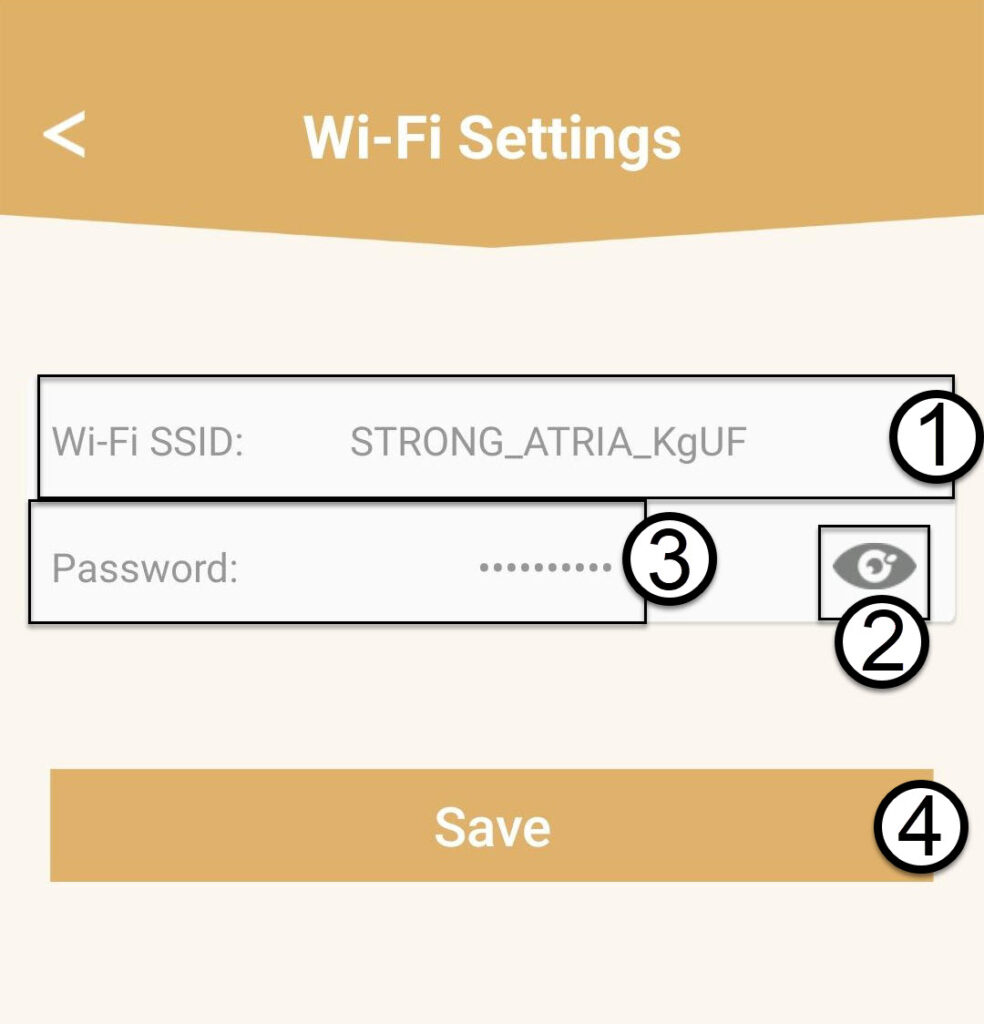
Indtast et nyt Wi-Fi-SSID, og klik på øjeikonet for at få vist adgangskoden og ændre den, inden du klikker på »Gem«.
3. Skrivde nye oplysninger ned
Skriv adgangskoden ned på et stykke papir.