5G AIRHOME 1050 | Wi-Fi 6
Alle spørgsmål
5G AIRHOME 1050 | Wi-Fi 6
Hvordan vælger jeg netværkstypen?

Din router har ét Wi-Fi-netværk og to mobilnetværk, enten i 4G eller 5G. Du skal først have et SIM-kort for at aktivere mobilnetværkene.
1 Opret forbindelsetil enheden
For at få adgang til netværkstypene skal du oprette forbindelse til webgrænsefladen. For at gøre dette skal du indtaste routerens SSID (Wi-Fi-netværksnavn) og Wi-Fi-adgangskode på din enhed:

2Adgangtil webgrænsefladen
Indtast derefter følgende IP-adresse i din browser: 192.168.0.1.

3Login
Du skal indtaste brugernavnet og derefter klikke på »Login«. For yderligere oplysninger om login kan du læse i vejledningen til login.

4. Konfiguration af forbindelsen
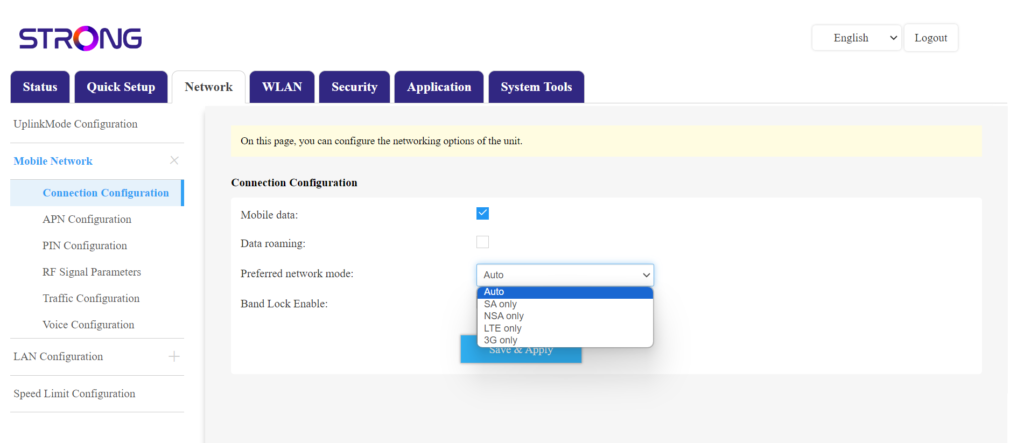
Klik på »Netværk«, og vælg »Forbindelseskonfiguration«.
Vælg derefter enten NSA (til 5G-netværk) eller LTE (til 4G-netværk) på listen over foretrukne netværk. Dette forhindrer, at dit netværk skifter mellem de forskellige netværkstyper. For at vælge det rette netværk kan du finde et kort over antennedækningen på din placering og se, hvilket netværk der er det bedste tilgængelige.