
4G+ AIRHOME 710 med aftagelige 4G+-antenner
Ingen varer fundet.
Ingen varer fundet.
Alle spørgsmål
4G+ AIRHOME 710 med aftagelige 4G+-antenner
Ingen varer fundet.
Ingen varer fundet.
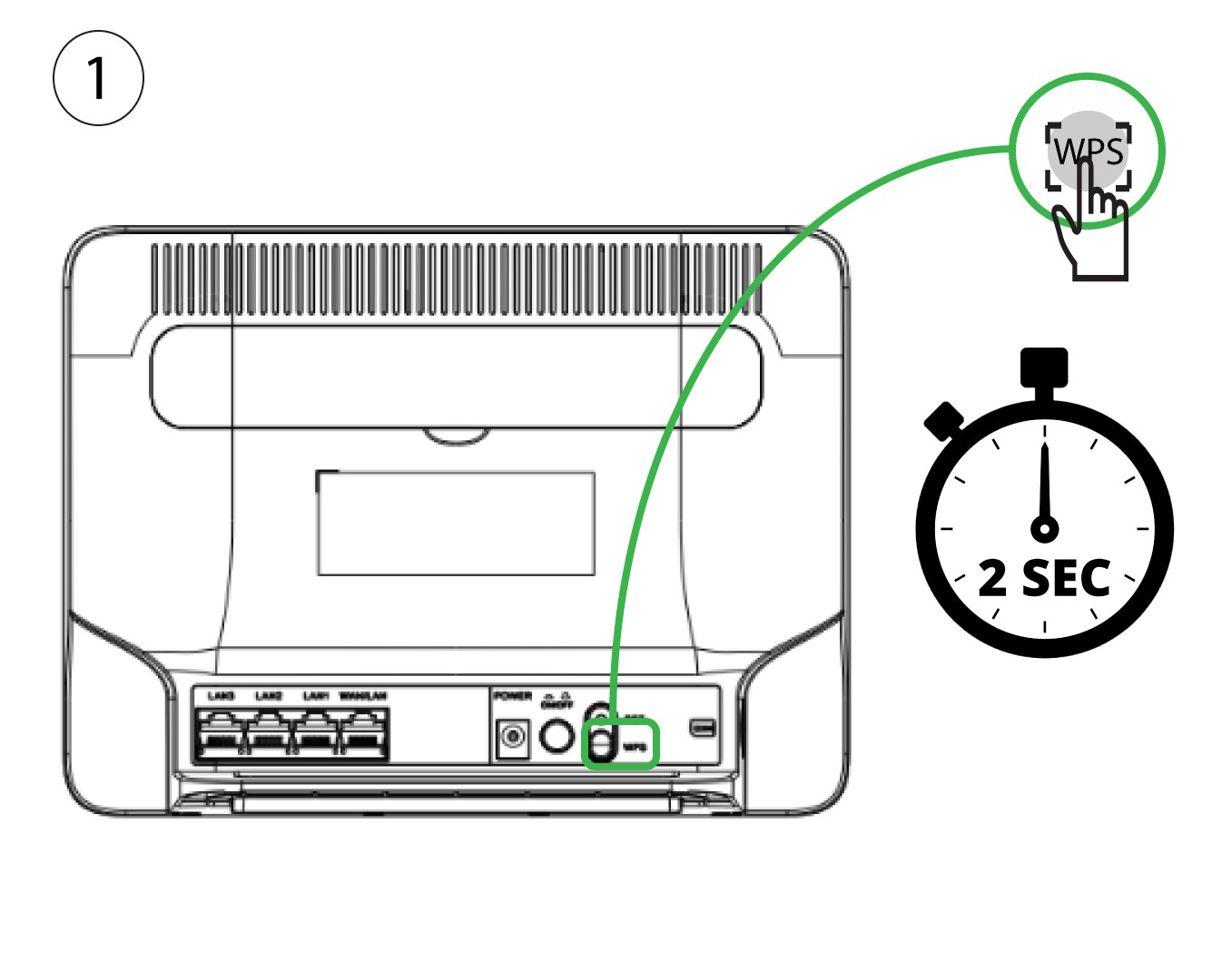
Hvordan forbinder jeg mine enheder via WPS?

Det er ikke muligt at oprette forbindelse til en mobiltelefon via WPS. For nemt at oprette forbindelse til Wi-Fi med din telefon skal du scanne QR-koden på bagsiden af din router. Så oprettes der automatisk forbindelse til netværket, uden at du behøver at indtaste Wi-Fi-adgangskoden.
1. AktiverWPS
Tryk på WPS-knappen i 2 sekunder, så alle kompatible enheder i dit hjem automatisk kan oprette forbindelse til routerens Wi-Fi-netværk.
2. FindWi-Fi-netværket
Gå til Wi-Fi-indstillingerne på din computer, og klik på routerens Wi-Fi-netværksnavn for at vælge det.

3 Opret forbindelsetil Wi-Fi-netværket
Klik derefter på knappen »Opret forbindelse«.
