
4G AIRHOME 200 Mini-Router mit abnehmbaren 4G-Antennen
Alle Fragen
4G AIRHOME 200 Mini-Router mit abnehmbaren 4G-Antennen
Wie kann ich die APN-Einstellungen meines Mobilfunkanbieters überprüfen und bearbeiten?
Wenn Ihre SIM-Karte vom Gerät nicht automatisch erkannt wird, müssen Sie sich bei der Web-Benutzeroberfläche anmelden, um die APN-Einstellungen zu überprüfen und gegebenenfalls anzupassen. Die APN-Einstellungen Ihres Mobilfunkanbieters finden Sie direkt auf dessen Website unter
oder Sie können diese beim Kundendienst Ihres Mobilfunkanbieters anfordern.
1. Stellen Sie eine Verbindungzum WLAN-Netzwerk Ihres Routers her.
Sie müssen eine Verbindung zur Web-Benutzeroberfläche herstellen. Geben Sie dazu die SSID (WLAN-Netzwerkname) und das WLAN-Passwort des Routers auf Ihrem Gerät ein.

2. Rufen Siedie IP-Adresse der Web-Benutzeroberfläche auf
Geben Sie anschließend die folgende IP-Adresse in Ihren Browser ein: 192.168.188.1

3Geben SieIhre Anmeldedaten ein
Sie müssen das Passwort eingeben. Klicken Sie anschließend auf „Anmelden“.

4Netzwerkeinstellungen
Klicken Sie auf „Netzwerkeinstellungen“.

5. Suchen Siedie APN-Daten Ihres Mobilfunkanbieters
Suchen Sie auf der Website Ihres Mobilfunkanbieters nach den APN-Einstellungen. Notieren Sie sich die folgenden Informationen:
- Name
- APN
- Benutzername
- Passwort
- Authentifizierung
6. Erstellen Sieeinen APN „ Handbuch “
Sollten die Angaben falsch sein, klicken Sie auf „APN“ und anschließend Handbuch auf „Neu hinzufügen“.
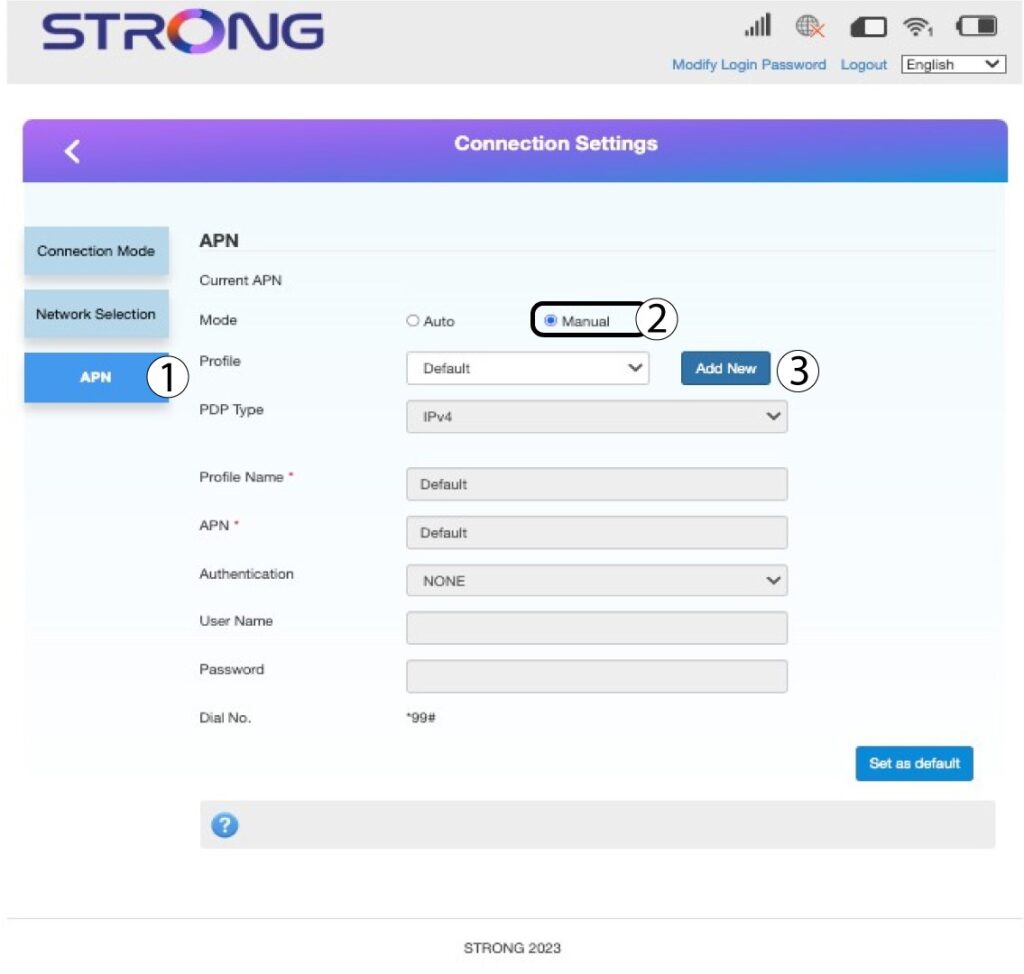
7. Geben Siedie APN-Daten ein
Geben Sie die folgenden Informationen ein, bevor Sie auf „Als Standard festlegen“ klicken:
- PDP-Typ: Wählen Sie „IPv4“ als Wert für den PDP-Typ aus.
- Profilname: Geben Sie den Namen Ihres Dienstanbieters ein.
- APN: Geben Sie die APN-Adresse ein.
- Authentifizierungstyp: Wählen Sie aus den folgenden Werten (NONE, CHAP, PAP) den von Ihrem Anbieter für Ihren APN definierten Authentifizierungstyp aus.
