
Punto de acceso Wi-Fi 4G+ AIRSPOT 510
No se han encontrado artículos.
No se han encontrado artículos.
Todas las preguntas
Punto de acceso Wi-Fi 4G+ AIRSPOT 510
No se han encontrado artículos.
No se han encontrado artículos.
¿Qué tipo de tarjeta SIM puedo utilizar en mi router?
Es necesario insertar una tarjeta SIM nano en la ranura para tarjetas SIM del 4G PORTABLE HOTSPOT 900 antes de encender el dispositivo.
Sigue los pasos que se indican en la ilustración siguiente:
- Coge tu tarjeta nano SIM.
- Retira la tapa trasera para ver la batería y extrae la batería.
- Inserta la tarjeta SIM.
- Coloca la batería, la tapa trasera y el cable « switch » en el dispositivo.
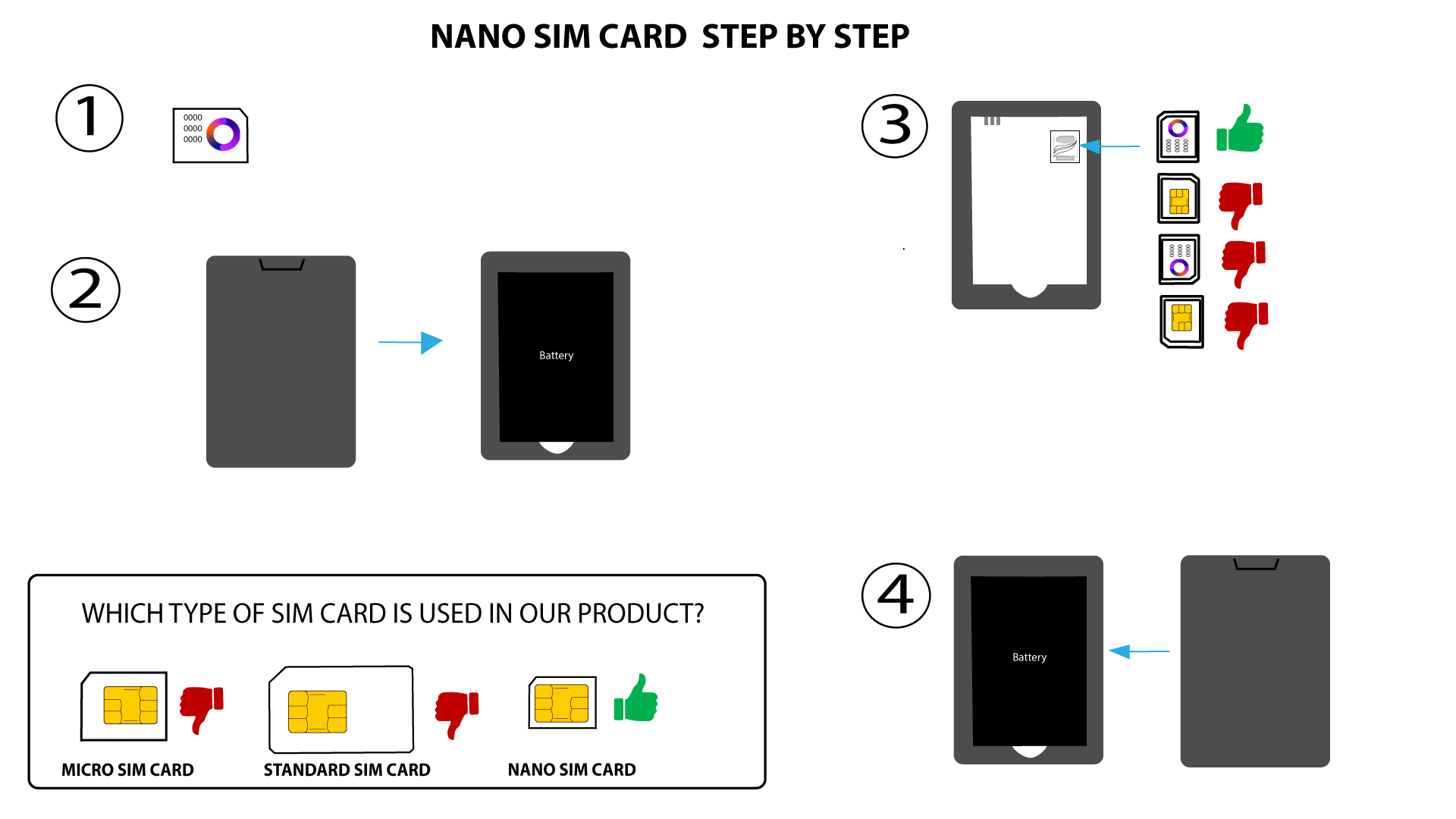

ADVERTENCIA: Si el dispositivo no detecta tu tarjeta SIM, comprueba que esté insertada en la orientación correcta. Si utilizas un adaptador, asegúrate de que esté bien insertado.