
FALKY SOLAR BATTERY CAMERA
All questions
LEDs, buttons and ports
Battery drains too fast / Solar panel is not charging
The 6-month battery life is measured under optimal conditions. The main causes of faster drain are:
- All Day Recording enabled — switch to Event Recording (Settings > Recording Management) to record only when motion is detected.
- Full Color Mode active — IR night vision consumes less power than the White Light LEDs.
- High detection sensitivity — reduce sensitivity or switch to AI Human Detection only.
Set a low battery alert at 20% in Settings (⚙) > Battery Management to receive a notification before the camera shuts down.
Solar panel not charging: check the cable is connected to the dedicated solar port (not the USB-C port), the panel is in direct sunlight and free of shadow (even partial shadow significantly reduces output), and the panel surface is clean. In winter, recharge via USB-C if the battery level drops.
Tips: The charge indicator LED (small hole on the side panel) lights red when charging via USB-C or solar panel, and turns blue when the battery is fully charged.
What do the LED colours mean?
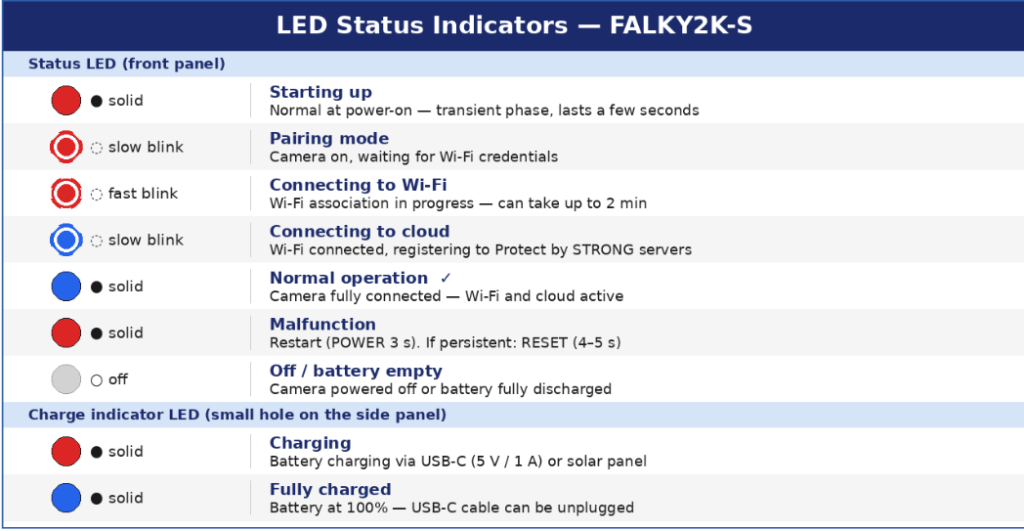
The status LED goes through a specific sequence during startup: solid red (starting up) → slow red blink (pairing mode) → fast red blink (Wi-Fi connecting) → slow blue blink (cloud connecting) → solid blue (fully operational). The blue blink stage is normal and means Wi-Fi is connected but cloud registration is still in progress.
Tips: The status LED can be disabled for a more discreet installation: Settings (⚙) > Network Indicator > Disable. The camera continues to operate normally.