Mini-routeur 4G AIRHOME 300 avec antennes 4G amovibles
Toutes les questions
Mini-routeur 4G AIRHOME 300 avec antennes 4G amovibles
Que puis-je faire dans l'interface utilisateur Web ?
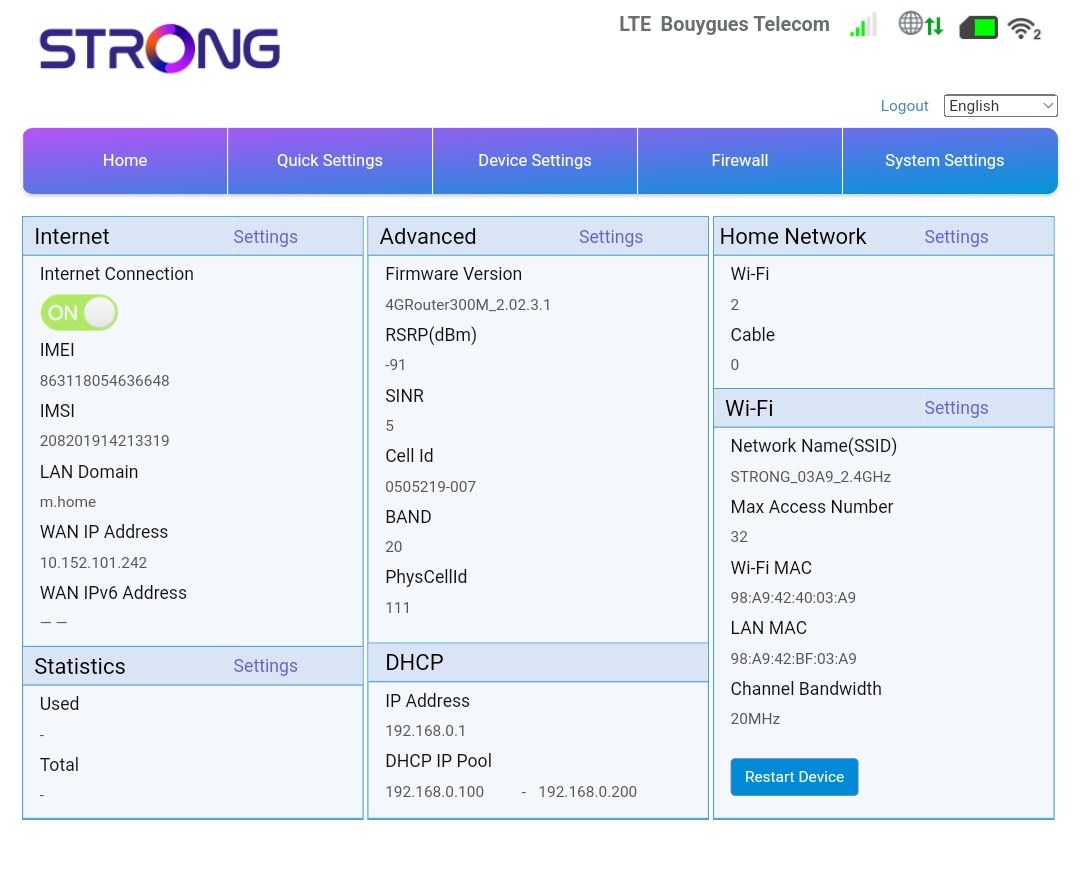
L'interface utilisateur Web est divisée en 5 sections ; pour plus d'informations, voir.
• Accueil : vous y trouverez les principales informations concernant votre routeur, notamment l’état de la connexion Internet, la version du micrologiciel, l’adresse IP, des informations sur le réseau Wi-Fi et le réseau domestique, etc.
• Paramètres rapides : vous permet de modifier votre SSID et votre mot de passe.
• Paramètres des appareils : vous permet de consulter le nombre d'appareils connectés, de gérer les paramètres d'adresse IP, les codes PIN, les paramètres d'antenne, les paramètres Wi-Fi, les paramètres Internet, etc.
• Pare-feu : vous permet de configurer les paramètres de sécurité.
• Paramètres système : vous permet de mettre à jour, de redémarrer ou de modifier vos paramètres.