5G AIRHOME 1050 | Wi-Fi 6
Minden kérdés
5G AIRHOME 1050 | Wi-Fi 6
Hogyan válasszam ki a hálózati típust?

Az útválasztód egy Wi-Fi-hálózattal és két mobiladat-hálózattal rendelkezik, amelyek 4G-s vagy 5G-s kapcsolatot biztosítanak. A mobilhálózatok aktiválásához először egy SIM-kártyára van szükséged.
1. Csatlakozzonaz eszközhöz
A hálózati típusok eléréséhez csatlakoznia kell a webes felhasználói felülethez. Ehhez írja be az eszközébe az útválasztó SSID-jét (Wi-Fi hálózat neve) és a Wi-Fi jelszavát:

2. Hozzáférésa webes felhasználói felülethez
Ezután írja be a böngészőjébe a következő IP-címet: 192.168.0.1.

3Bejelentkezés
Adja meg a felhasználónevet, majd kattintson a „Bejelentkezés” gombra. A bejelentkezéssel kapcsolatos további információkért kérjük, olvassa el a bejelentkezési útmutatót.

4. A kapcsolatbeállítása
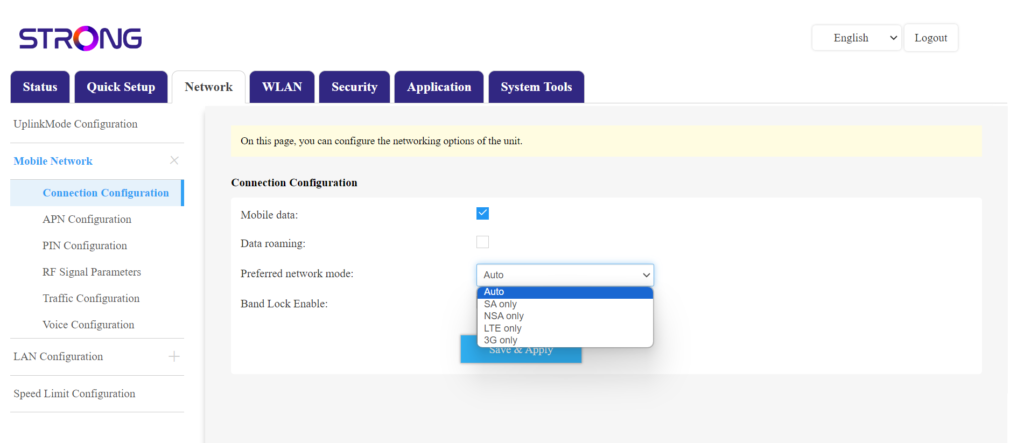
Kattintson a „Hálózat” elemre, majd válassza a „Kapcsolatbeállítások” lehetőséget.
Ezután a „Kívánt hálózatok” listában válassza ki az „NSA” (5G-hálózat) vagy az „LTE” (4G-hálózat) lehetőséget; ezzel megakadályozhatja, hogy a készülék a különböző hálózattípusok között váltson. A megfelelő hálózat kiválasztásához keresse meg a tartózkodási helyére vonatkozó antennatérképet, hogy megnézze, melyik a legjobb elérhető hálózat.