
Wi-Fi 4G+ AIRSPOT 510
Nessun articolo trovato.
Nessun articolo trovato.
Tutte le domande
Wi-Fi 4G+ AIRSPOT 510
Nessun articolo trovato.
Nessun articolo trovato.
Come faccio a modificare la password di amministratore?
1. Accedereall'interfaccia utente web
Per accedere all'interfaccia utente web, consultare la sezione " Come si accede all'interfaccia utente web?".
2. Accedialle impostazioni della password
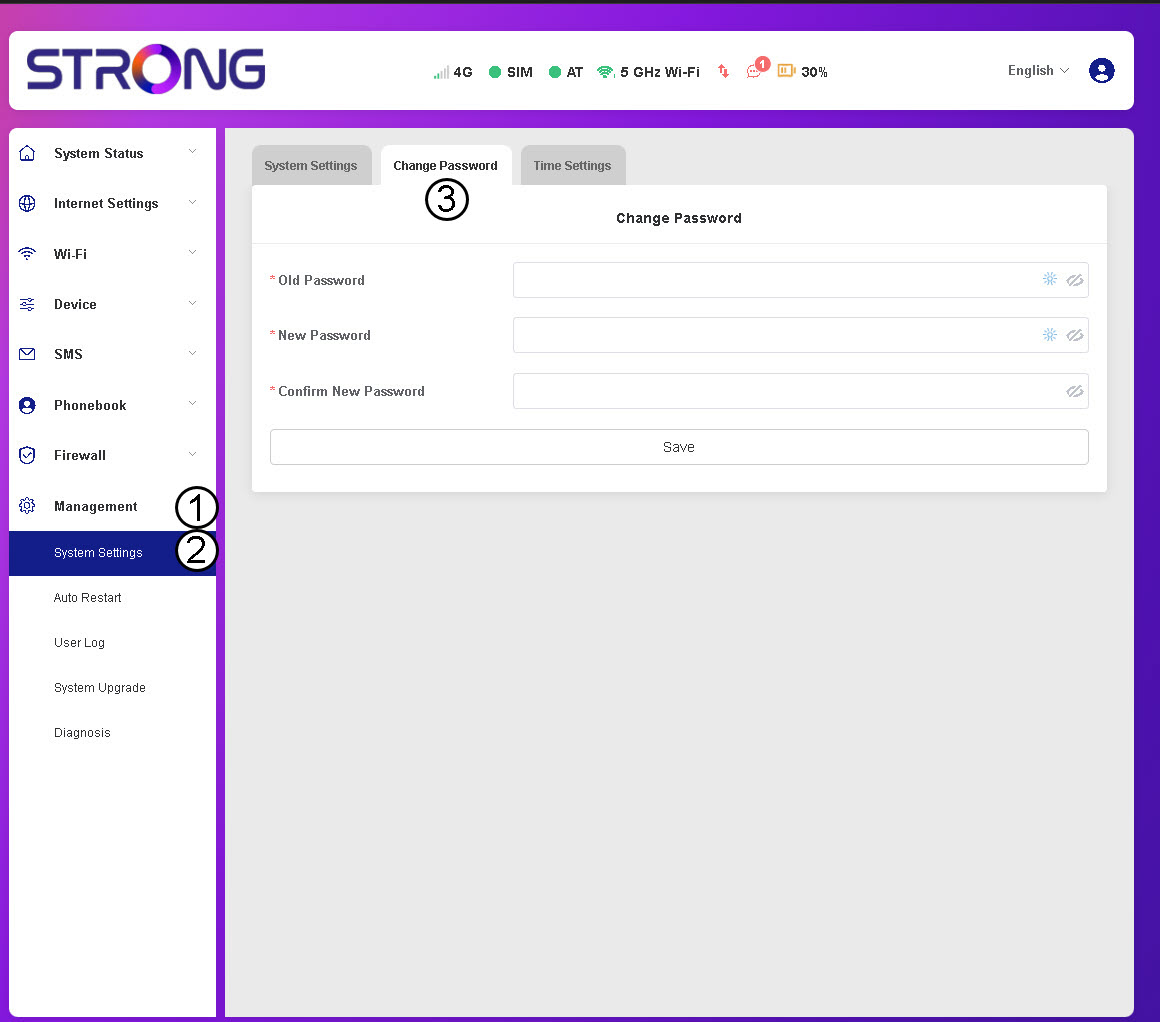
Nella sezione "Gestione ", fare clic su " Impostazioni di sistema " e poi su " Modifica password".
3. Inseriscii dati relativi alla password
A questo punto, inserisci le seguenti informazioni prima di fare clic su “Salva”:
- Vecchia password: inserisci la tua password attuale.
- Nuova password: inserisci una password composta da almeno 8 caratteri e che includa una combinazione di lettere maiuscole, minuscole, numeri e caratteri speciali. Sono ammessi solo i seguenti caratteri speciali: @$%*&.
- Conferma nuova password: inserisci la stessa password indicata nel campo precedente.


ATTENZIONE: se hai dimenticato la tua password attuale, dovrai ripristinare le impostazioni di fabbrica del dispositivo.