
4G+ AIRSPOT 510 Mobiele wifi
Geen items gevonden.
Geen items gevonden.
Alle vragen
4G+ AIRSPOT 510 Mobiele wifi
Geen items gevonden.
Geen items gevonden.
Hoe kan ik de APN-instellingen van mijn apparaat beheren?
Soms kunnen er problemen optreden met het mobiele datanetwerk nadat u uw apparaat hebt geconfigureerd en uw pincode hebt ingevoerd. Volg in dat geval de onderstaande stappen om uw APN-gegevens te controleren.
1. Opende webinterface
Volg deze procedure om verbinding te maken met de webinterface. Hoe krijg ik toegang tot de webinterface?
2. APN-configuratie openen
Klik op ‘Internetinstellingen ’ en vervolgens op ‘APN-configuratie’. Klik daarna op ‘APN toevoegen’.
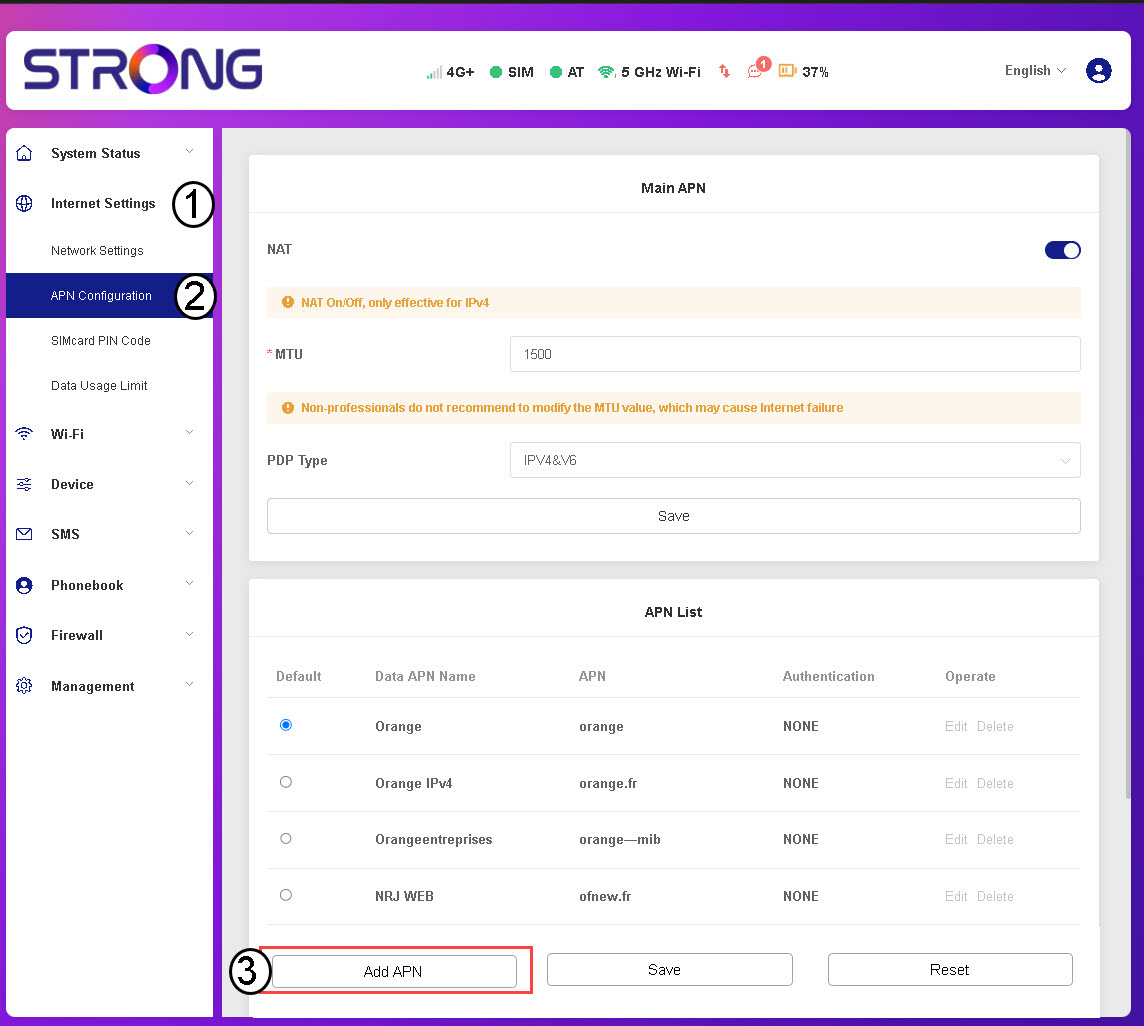
3. APN-gegevens invoerenen opslaan
Voer de volgende gegevens in voordat u op ‘Opslaan’ klikt :
- APN-naam: Voer de APN-naam in die u van uw serviceprovider hebt ontvangen.
- APN: Voer de APN in die u van uw provider hebt ontvangen.
- Authenticatie: Selecteer het authenticatietype uit de lijst op basis van de informatie die u van uw serviceprovider hebt ontvangen.