4G+ AIRHOME 710 met afneembare 4G+-antennes
Geen items gevonden.
Geen items gevonden.
Alle vragen
4G+ AIRHOME 710 met afneembare 4G+-antennes
Geen items gevonden.
Geen items gevonden.
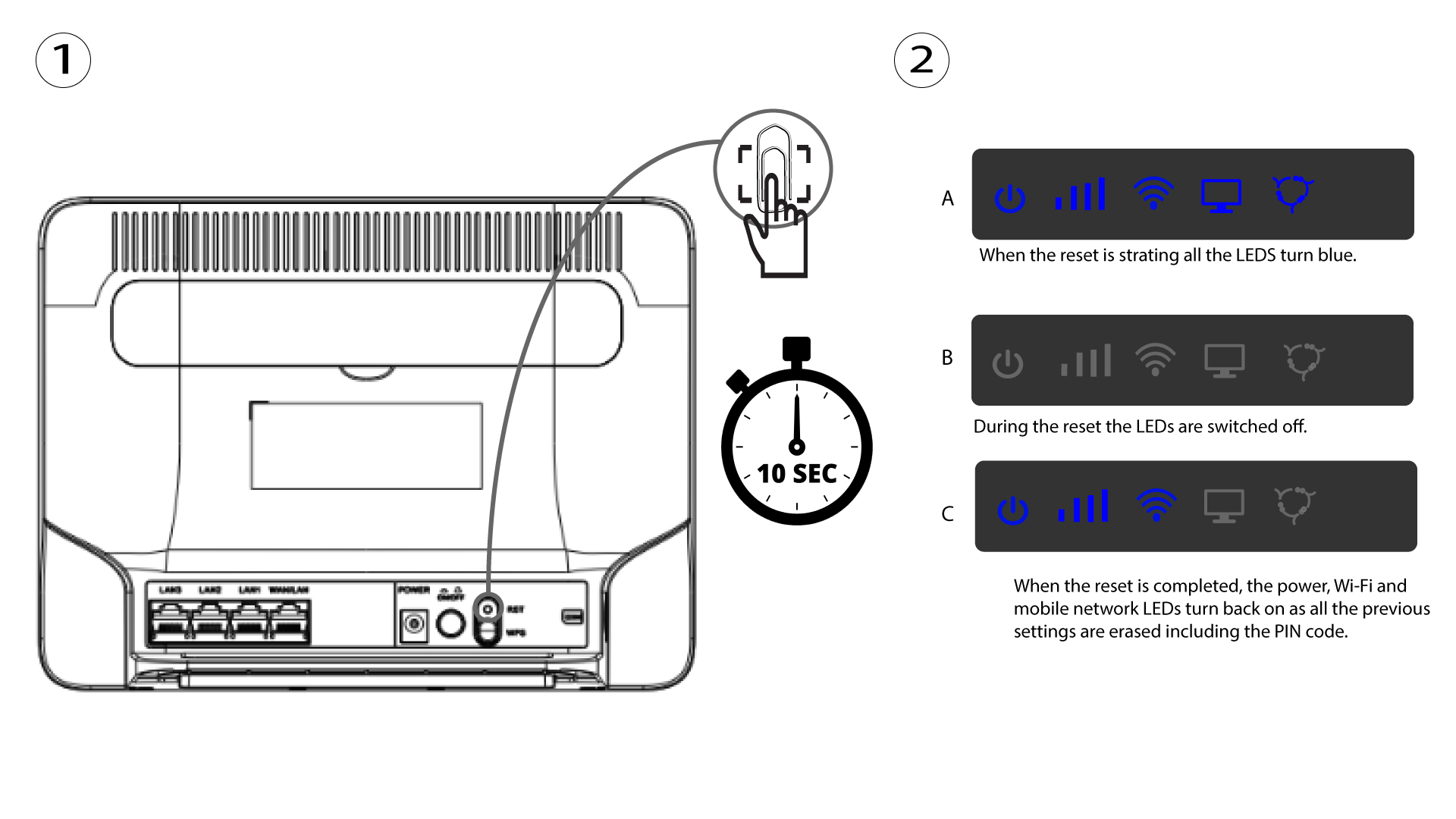
Hoe zet ik mijn router terug naar de fabrieksinstellingen? (Resetknop)
Het kan soms voorkomen dat uw apparaat niet goed werkt en dat u geen toegang tot internet hebt. In dat geval raden we u aan uw apparaat terug te zetten naar de fabrieksinstellingen en het daarna indien nodig bij te werken.
U kunt dit op twee manieren doen: u kunt het apparaat resetten door op de resetknop te drukken of via de webinterface.
VOORBEELD 1: Resetknop.
Steek hiervoor een paperclip in het gaatje om de resetknop in te drukken. Houd de resetknop 10 seconden ingedrukt. De LED’s zullen switch uitgaan en weer aangaan