5G AIRHOME 1050 | Wi-Fi 6
Todas as perguntas
5G AIRHOME 1050 | Wi-Fi 6
Como é que escolho o tipo de rede?

O seu router dispõe de uma rede Wi-Fi e de duas redes de dados móveis, em 4G ou 5G. Primeiro, precisa de um cartão SIM para ativar as redes móveis.
1Ligarao dispositivo
Para aceder aos tipos de rede, tem de se ligar à interface de utilizador web. Para tal, introduza o SSID (nome da rede Wi-Fi) e a palavra-passe Wi-Fi do router no seu dispositivo:

2. Acessoà interface de utilizador web
Em seguida, introduza o seguinte endereço IP no seu navegador: 192.168.0.1.

3Iniciarsessão
Deve introduzir o nome de utilizador e , em seguida, clicar em «Iniciar sessão». Para mais informações sobre o início de sessão, consulte o procedimento de início de sessão.

4. Configuração da ligação
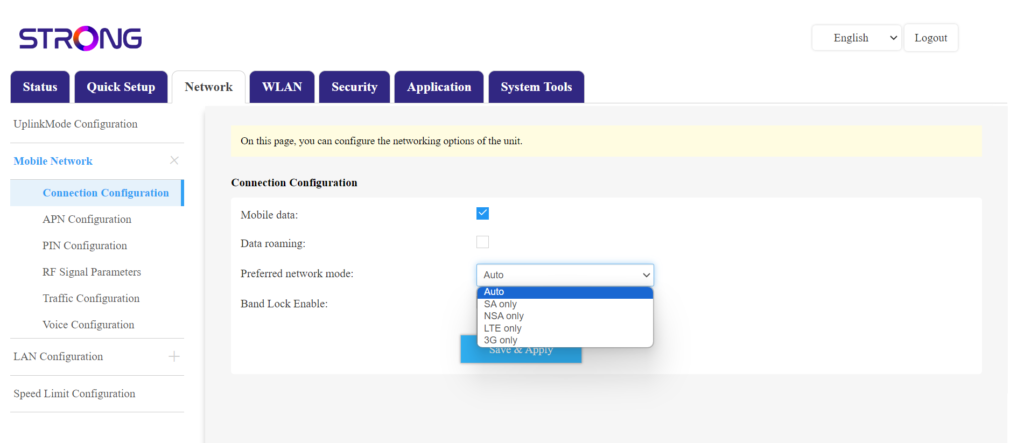
Clique em «Rede » e selecione «Configuração da ligação».
Em seguida, na lista de redes preferidas, selecione «NSA» (para a rede 5G) ou «LTE» (para a rede 4G); isto impedirá que a sua rede alterne entre os diferentes tipos de rede. Para escolher a rede adequada, consulte um mapa da cobertura das antenas na sua localização para verificar qual é a melhor rede disponível.