
ATRIA Wi-Fi 5 Mesh 2100 (add-on)
Všetky otázky
ATRIA Wi-Fi 5 Mesh 2100 (add-on)
Ako môžem zmeniť SSID (názov siete Wi-Fi) a heslo mojej siete Wi-Fi mesh ?

Upozornenie: Nezabudnite, že heslo musí mať dĺžku 8 až 32 znakov a musí obsahovať veľké a malé písmen
, čísla a aspoň jeden špeciálny znak (@, $, !, %, *, ?, &).
Ak sa chcete pripojiť k webovému používateľskému rozhraniu, postupujte podľa nasledujúcich pokynov: Ako sa prihlásiť do webového používateľského rozhrania?
1PRÍPAD1: Zmena údajov o sieti Wi-Fi v webovom používateľskom rozhraní
Kliknite na položky „WLAN“ a „WLAN 2,4 GHz“. Následne zadajte nasledujúce údaje a kliknite na tlačidlo „Potvrdiť“:
- SSID: Zadajte nový názov siete
- PSK: Zadajte nové heslo.

2Zapíštesi nové informácie
Zapíšte si nové sieťové údaje na papier.

Ak sa chcete pripojiť k aplikácii, postupujte podľa týchto pokynov: Ako používať aplikáciu Atria „ Mesh “?
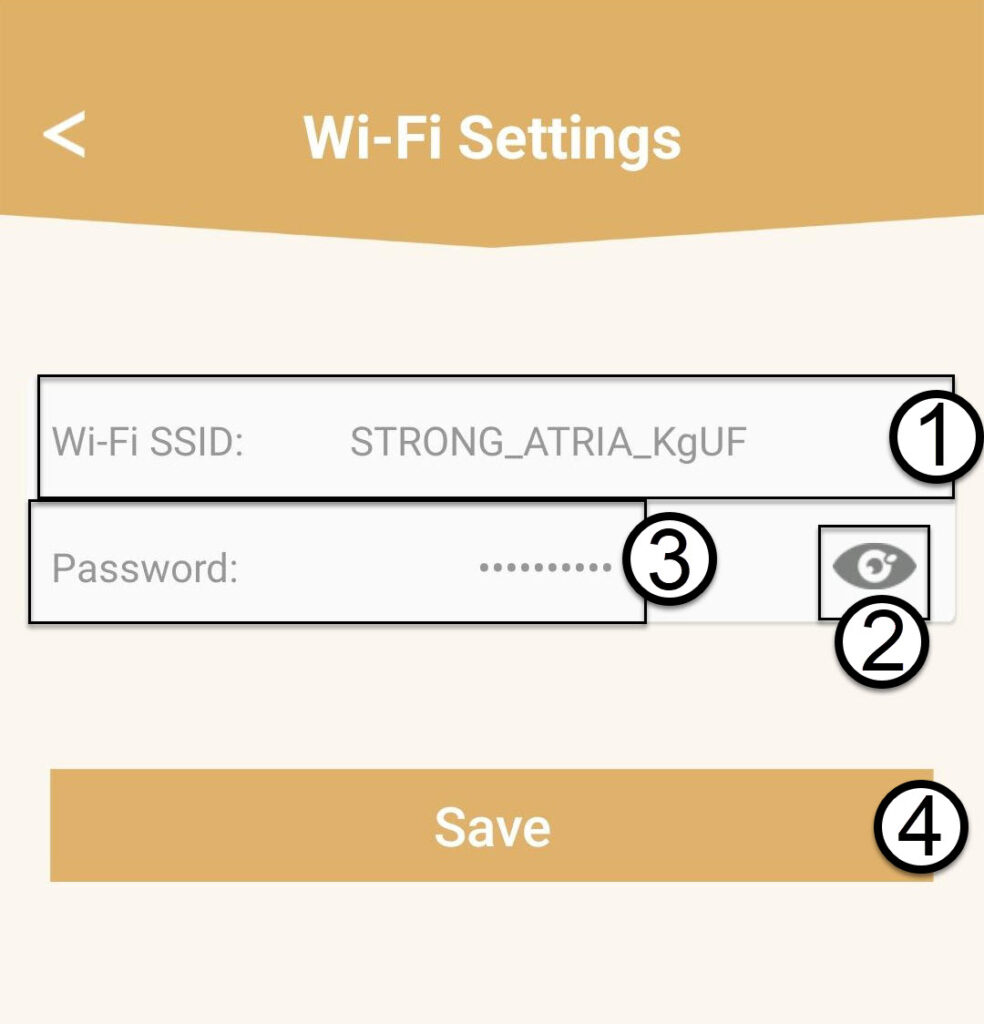
1PRÍPAD2: Zmena údajov o sieti Wi-Fi v aplikácii
Kliknite na položku „Nastavenia Wi-Fi“.

2Zapíštesi nové informácie
Zadajte nové SSID siete Wi-Fi a kliknutím na ikonu oka zobrazte heslo a zmeňte ho, potom kliknite na Uložiť.
3Zapíštesi nové informácie
Zapíšte si heslo na kúsok papiera.