
Dvojpásmový opakovač 1200
Nenašli sa žiadne položky.
Nenašli sa žiadne položky.
Všetky otázky
Dvojpásmový opakovač 1200
Nenašli sa žiadne položky.
Nenašli sa žiadne položky.
Ako nastavím svoj opakovač?
TIPY: Pred nastavením opakovača si prečítajte nasledujúci postup, aby ste určili vhodné umiestnenie opakovača: Aké je najlepšie umiestnenie pre môj opakovač?
1. Prístupk webovému rozhraniu opakovača
Na pripojenie k webovému používateľskému rozhraniu postupujte podľa jedného z nasledujúcich postupov:
- Ako sa pripojím k webovému rozhraniu opakovača? (Kábel RJ45)
- Ako sa pripojím k webovému rozhraniu opakovača? (Wi-Fi)
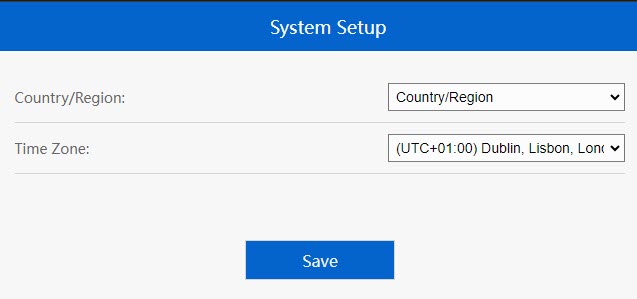
2.Výber časovéhopásma
Ak je automaticky zistené časové pásmo nesprávne, vyberte správne časové pásmo zo zoznamu a potom kliknite na tlačidlo Uložiť.
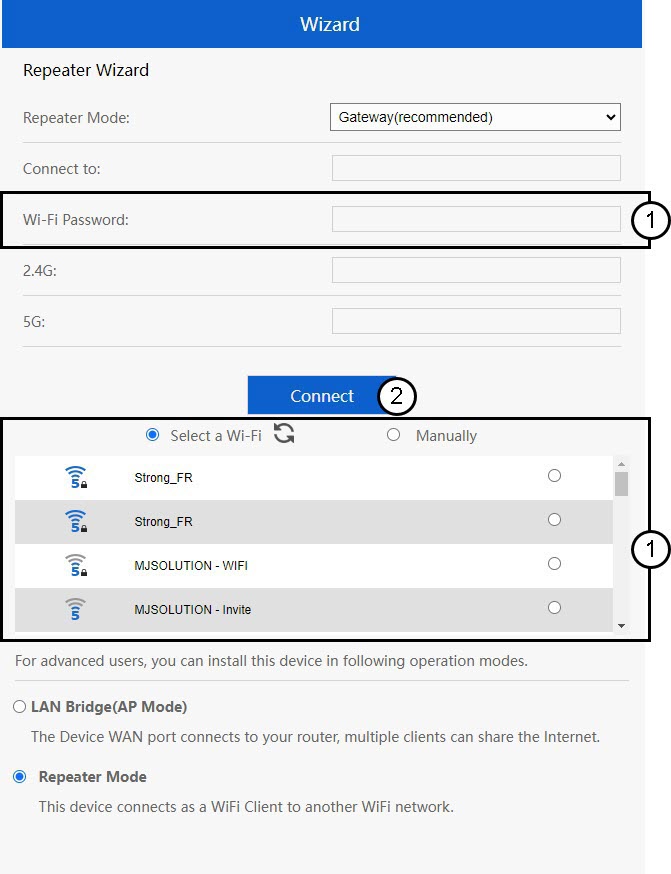
3. Pripojenieprostredníctvom sprievodcu nastavením
Otvorí sa sprievodca nastavením opakovača. Kliknite na (Možno budete musieť zadať heslo siete Wi-Fi, ku ktorej sa chcete pripojiť)
4. Dokončeniekonfigurácie
Počkajte, prosím, kým sa opakovač nakonfiguruje.
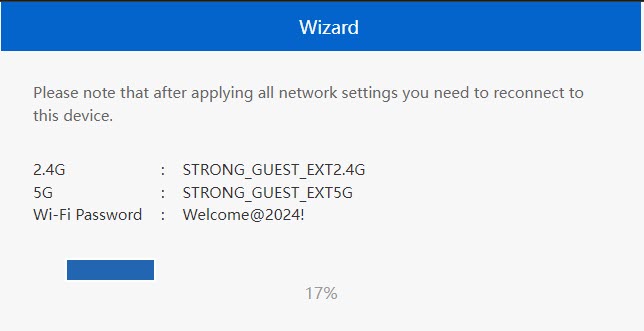

Upozornenie: Zapíšte si prosím údaje o týchto dvoch sieťach Wi-Fi. Tieto údaje budete potrebovať na pripojenie k sieti.