ATRIA Wi-Fi 6 Mesh 3000 (balenie po 2 kusoch)
Všetky otázky
ATRIA Wi-Fi 6 Mesh 3000 (balenie po 2 kusoch)
Ako sa používa aplikácia Atria „ Mesh “?
Ako sa používa aplikácia AtriaMesh?
1Atria– aplikácia „ Mesh “
Stiahnite si aplikáciu pre smartfóny „ATRIA MESH “ z App Store alebo z Google Play Store.

2.Overovacie údaje
Potom sa musíte so svojím smartfónom pripojiť k Wi-Fi sieti zariadenia Mesh a následne sa prihlásiť do aplikácie pomocou prihlasovacích údajov, ktoré by mali byť„admin“ a„admin“, ak ste ich nezmenili.

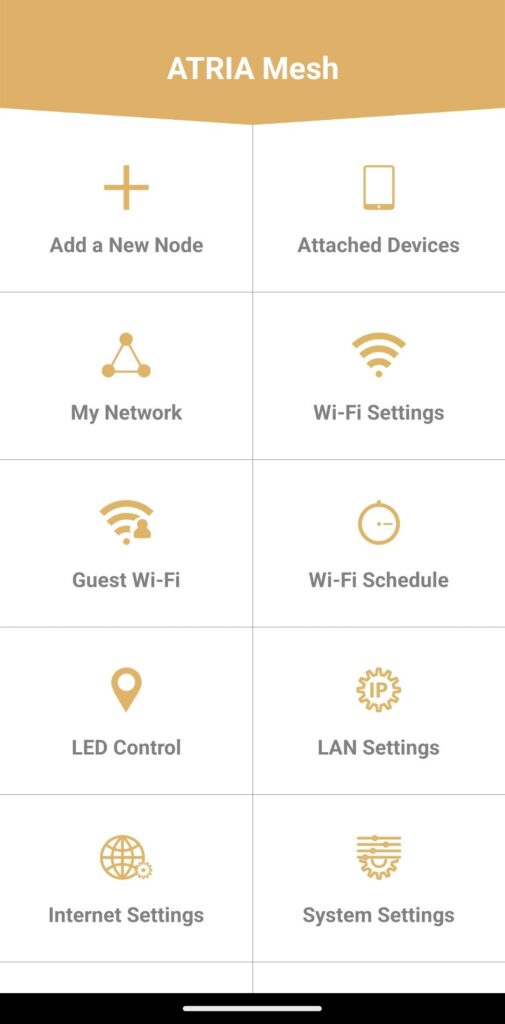
3Hlavnémenu
Teraz ste na hlavnej stránke.
• Pridať nový uzol: Tu môžete pridať nové zariadenie Mesh do vašej siete Mesh .
• Pripojené zariadenia: Tu môžete skontrolovať, ktoré zariadenia sú pripojené k vašej sieti Mesh .
• Moja sieť: Tu môžete skontrolovať všetky zariadenia Mesh pripojené k vašej sieti Mesh .
• Nastavenia Wi-Fi: Tu môžete upravovať a meniť SSID (názov siete Wi-Fi) a heslo vašej siete Wi-Fi Mesh .
• Hosťovská Wi-Fi: Tu môžete nastaviť a konfigurovať hosťovskú Wi-Fi v pásme 2,4 GHz alebo 5 GHz.
• Časový plán Wi-Fi: Tu môžete naplánovať časové obdobie, počas ktorého bude vaša Wi-Fi sieť aktívna.
• Ovládanie LED: Tu môžete zapnúť alebo vypnúť LED diódy na vašom zariadení Mesh .
• Nastavenia LAN: Tu môžete povoliť alebo zakázať protokol DHCP.
• Nastavenia internetu: Tu môžete nakonfigurovať pripojenie DHCP, ručné nastavenie DNS, PPPoE a nastaviť statickú IP adresu.
• Systémové nastavenia: Tu môžete zmeniť používateľské meno a heslo správcu pre prístup k aplikácii.