
4G+ AIRSPOT 510 Мобилни Wi-Fi
Нема пронађених ставки.
Нема пронађених ставки.
Сва питања
4G+ AIRSPOT 510 Мобилни Wi-Fi
Нема пронађених ставки.
Нема пронађених ставки.
Како да деактивирам свој ПИН код?
Када уметнете СИМ картицу и унесете ПИН код помоћу ЛЦД екрана Ми-Фи уређаја, ПИН код се аутоматски деактивира.
Можете проверити да ли је ПИН код деактивиран пратећи следеће кораке:
1 Приступите веб интерфејсу
Повежите се са веб корисничким интерфејсом.
2 Идите до подешавања ПИН-а за СИМ картицу
Кликните на Интернет подешавања, а затим изаберите ПИН код СИМ картице.
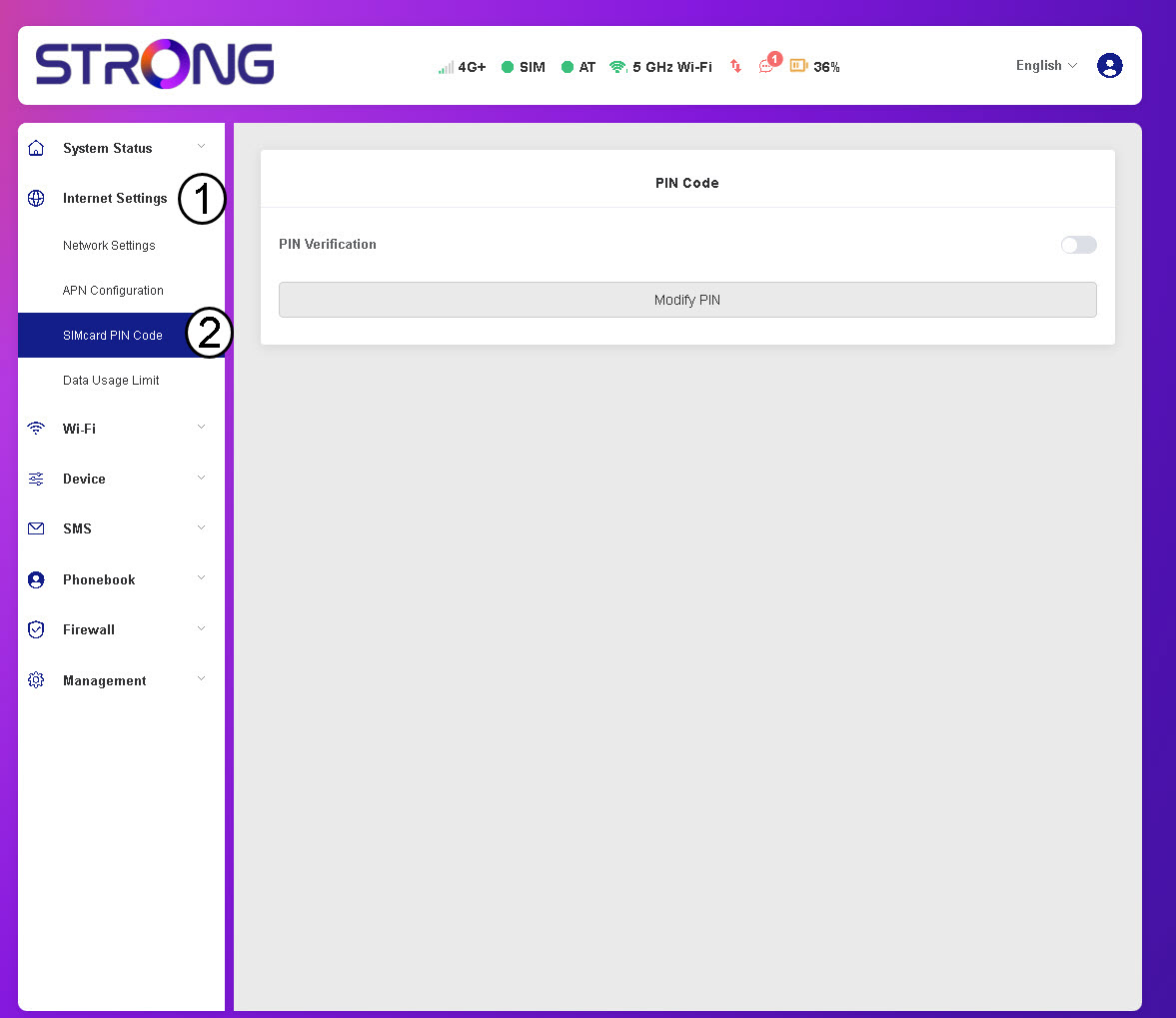
3 Проверите статус ПИН-а
Проверите да ли је прекидач за верификацију ПИН-а сив, што указује да је ПИН код деактивиран.
