5G AIRHOME 1050 | Wi-Fi 6
Alla frågor
5G AIRHOME 1050 | Wi-Fi 6
Hur väljer jag nätverkstyp?

Din router har ett Wi-Fi-nätverk och två mobildatanätverk, antingen 4G eller 5G. Du behöver först ett SIM-kort för att aktivera mobilnätverken.
1. Ansluttill enheten
För att komma åt nätverkstyperna måste du ansluta till webbgränssnittet. För att göra det anger du routerns SSID (Wi-Fi-nätverksnamn) och Wi-Fi-lösenord på din enhet:

2. Åtkomsttill webbgränssnittet
Ange sedan följande IP-adress i din webbläsare: 192.168.0.1.

3Inloggning
Du måste ange användarnamnet och sedan klicka på ”Logga in”. För mer information om inloggningen, se inloggningsanvisningarna.

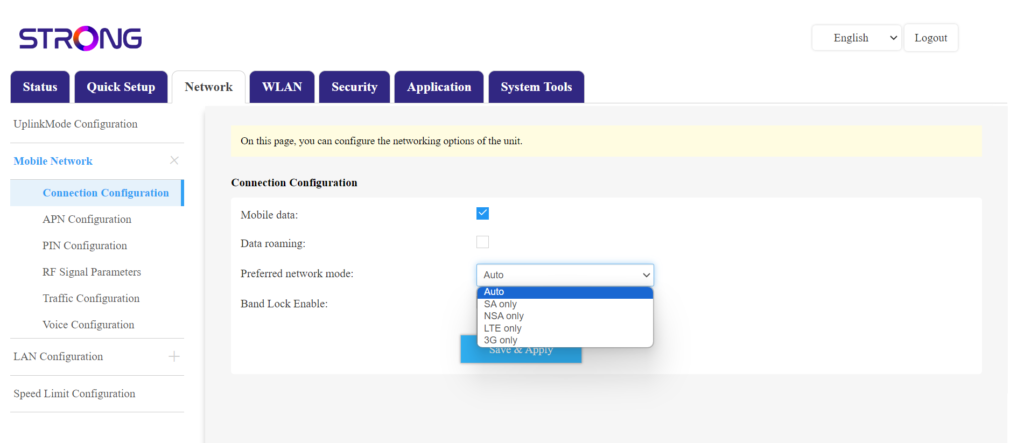
4. Anslutningskonfiguration
Klicka på ”Nätverk ” och välj ”Anslutningskonfiguration”.
Välj sedan antingen NSA (för 5G-nät) eller LTE (för 4G-nät) i listan över föredragna nätverk. Detta förhindrar att nätverket växlar mellan olika nätverkstyper. För att välja rätt nätverk kan du ta hjälp av en karta över antenntäckningen där du befinner dig och se vilket nätverk som är bäst tillgängligt.