5G AIRHOME 1050 | Wi-Fi 6
Všechny otázky
5G AIRHOME 1050 | Wi-Fi 6
Jak si vyberu typ sítě?

Váš router disponuje jednou sítí Wi-Fi a dvěma mobilními datovými sítěmi, a to buď v pásmu 4G, nebo 5G. K aktivaci mobilních sítí nejprve potřebujete jednu SIM kartu.
1. Připojte sek zařízení
Chcete-li získat přístup k typům sítí, musíte se připojit k webovému uživatelskému rozhraní. Za tímto účelem zadejte do svého zařízení SSID (název sítě Wi-Fi) a heslo k Wi-Fi routeru:

2. Přístupk webovému uživatelskému rozhraní
Poté zadejte do prohlížeče následující IP adresu: 192.168.0.1.

3Přihlášení
Zadejte uživatelské jméno a poté klikněte na tlačítko „Přihlásit se“. Další informace o přihlašování najdete v pokynech k přihlášení.

4. Konfigurace připojení
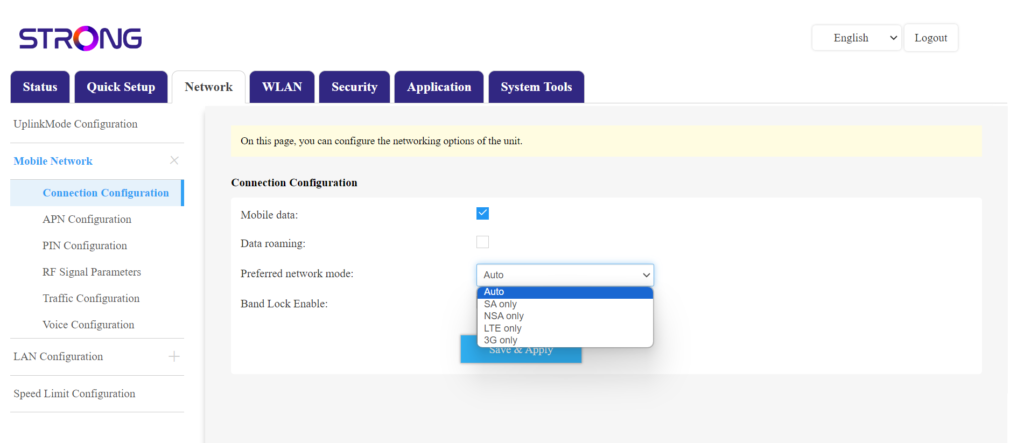
Klikněte na položku „Síť “ a vyberte možnost „Konfigurace připojení“.
Poté v seznamu preferovaných sítí vyberte buď NSA (pro síť 5G), nebo LTE (pro síť 4G) – tím zabráníte přepínání mezi různými typy sítí. Chcete-li vybrat vhodnou síť, podívejte se na mapu pokrytí antén ve vaší lokalitě, abyste zjistili, která síť je k dispozici nejlepší.