
Mobilní Wi-Fi 4G+ AIRSPOT 510
Nebyly nalezeny žádné položky.
Nebyly nalezeny žádné položky.
Všechny otázky
Mobilní Wi-Fi 4G+ AIRSPOT 510
Nebyly nalezeny žádné položky.
Nebyly nalezeny žádné položky.
Jaký typ SIM karty mohu použít ve svém routeru?
Před zapnutím zařízení 4G PORTABLE HOTSPOT 900 je nutné do jeho slotu pro SIM kartu vložit nano SIM kartu.
Postupujte podle kroků na následujícím obrázku:
- Vezměte si svou nano SIM kartu.
- Sejměte zadní kryt, abyste získali přístup k baterii, a vyjměte ji.
- Vložte SIM kartu.
- Vložte do zařízení baterii, nasaďte zadní kryt a připojte kabel switch .
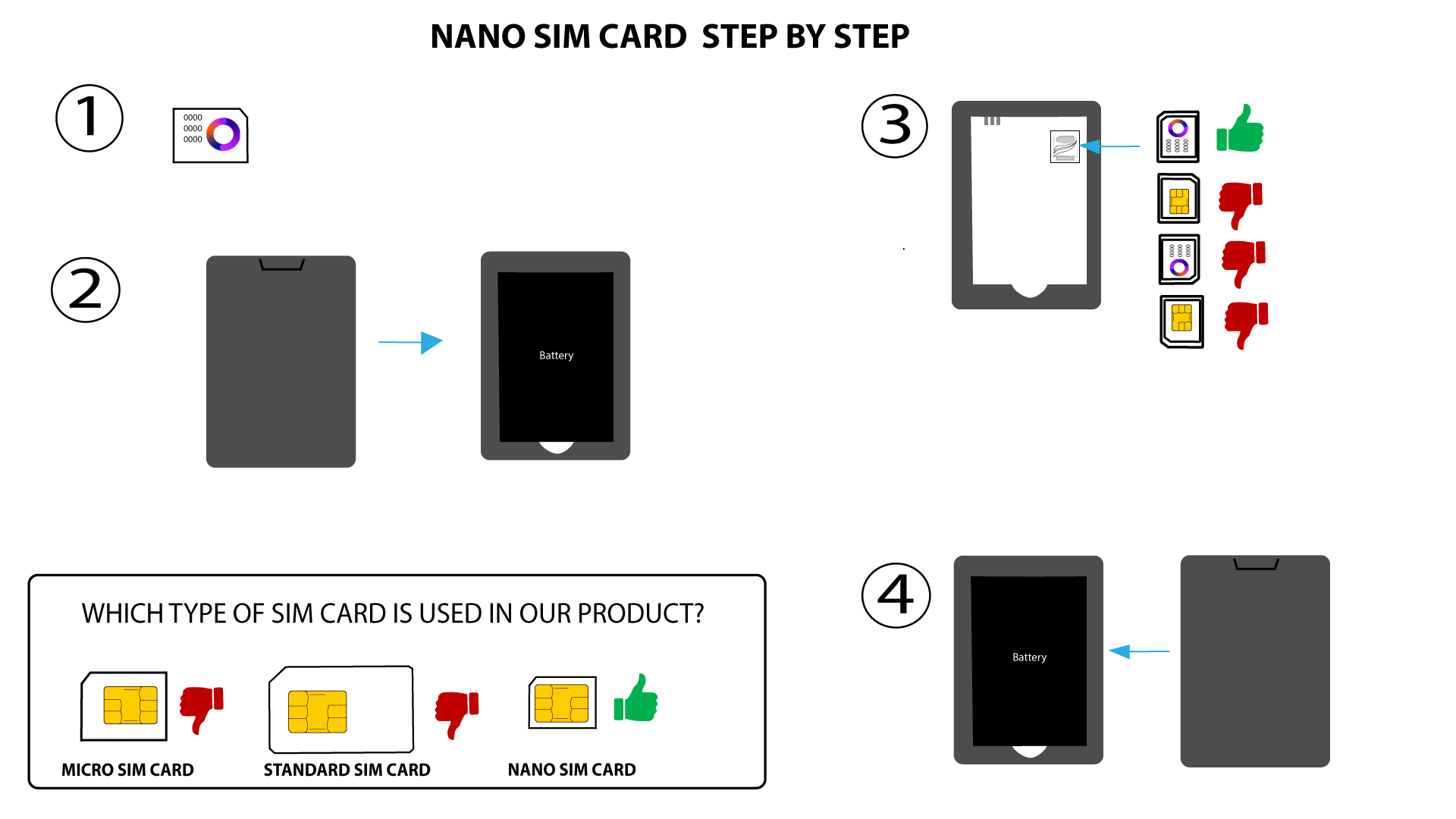

UPOZORNĚNÍ: Pokud zařízení nerozpozná vaši SIM kartu, zkontrolujte, zda je vložena ve správné poloze. Pokud používáte adaptér, ujistěte se, že je zcela zasunutý.