
4G+ AIRSPOT 510 Mobil Wi-Fi
Ingen varer fundet.
Ingen varer fundet.
Alle spørgsmål
4G+ AIRSPOT 510 Mobil Wi-Fi
Ingen varer fundet.
Ingen varer fundet.
Hvilken type SIM-kort kan jeg bruge i min router?
Der skal indsættes et nano-SIM-kort i SIM-kortåbningen på 4G PORTABLE HOTSPOT 900, inden enheden tændes.
Følg trinene på illustrationen nedenfor:
- Tag dit nano-SIM-kort frem.
- Fjern bagdækslet for at få adgang til batteriet, og tag batteriet ud.
- Sæt SIM-kortet i.
- Sæt batteriet, bagdækslet og switch på enheden.
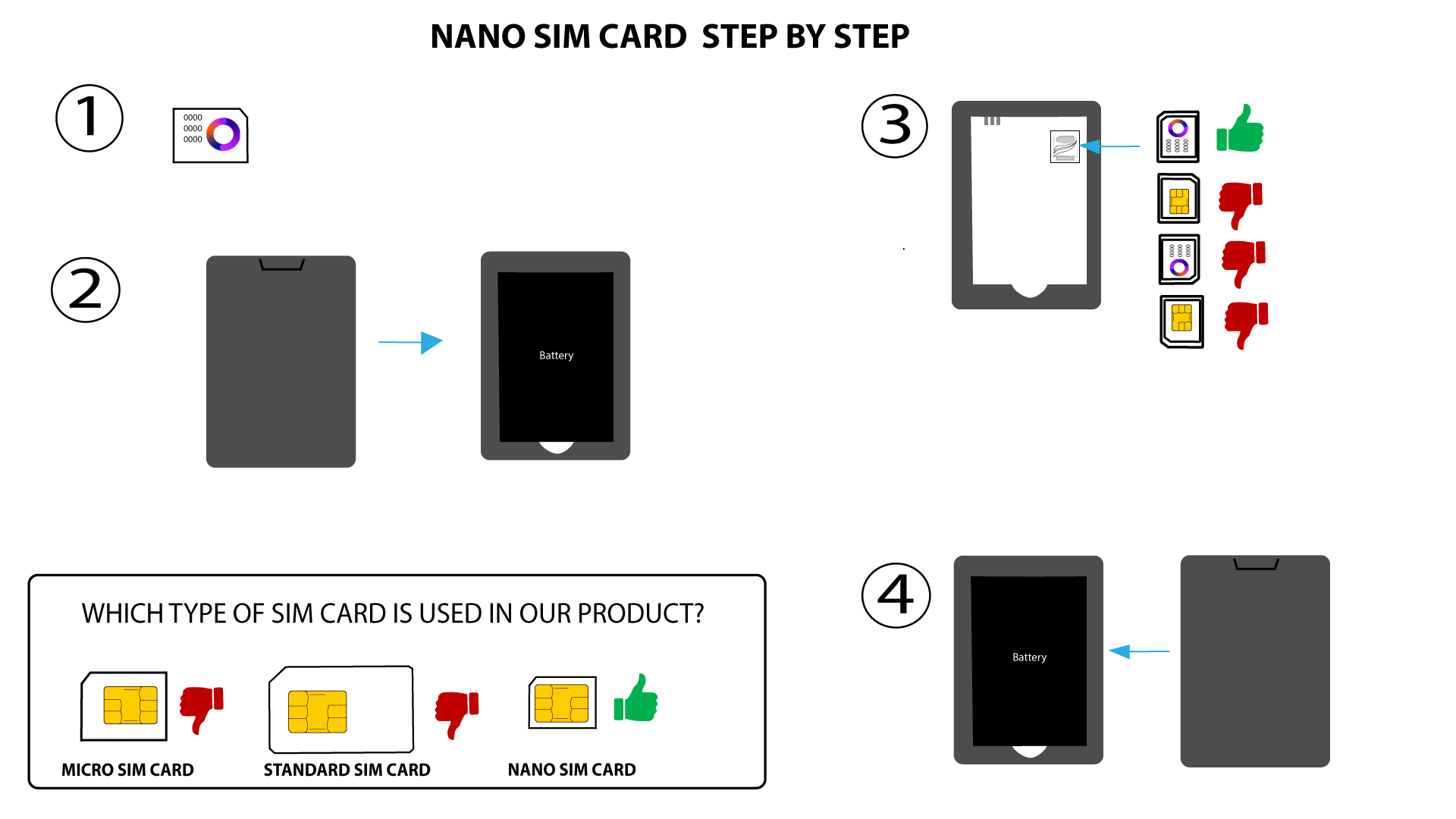

ADVARSEL: Hvis enheden ikke genkender dit SIM-kort, skal du kontrollere, at det er sat i med den rigtige retning. Hvis du bruger en adapter, skal du sikre dig, at den er sat helt ind.