5G AIRHOME 1050 | Wi-Fi 6
Δεν βρέθηκαν αντικείμενα.
Δεν βρέθηκαν αντικείμενα.
Όλες οι ερωτήσεις
5G AIRHOME 1050 | Wi-Fi 6
Δεν βρέθηκαν αντικείμενα.
Δεν βρέθηκαν αντικείμενα.
Πώς μπορώ να αλλάξω τον κωδικό πρόσβασης διαχειριστή;

Προειδοποίηση: λάβετε υπόψη ότι δεν είναι δυνατή η αλλαγή του ονόματος χρήστη διαχειριστή. Μπορείτε να αλλάξετε μόνο τον κωδικό πρόσβασης.
1. Συνδέσουστη συσκευή
Για να ενημερώσετε τον κωδικό πρόσβασης διαχειριστή, πρέπει να συνδεθείτε στο Wi-Fi της συσκευής σας.

2. Πρόσβασηστο περιβάλλον χρήστη του ιστού
Στη συνέχεια, πληκτρολογήστε την ακόλουθη διεύθυνση IP: 168.0.1 στον περιηγητή σας.

3Σύνδεση
Πρέπει να εισαγάγετε το όνομα χρήστη και τον κωδικό πρόσβασης. Στη συνέχεια , κάντε κλικ στο «Σύνδεση».

4Διαχείριση χρηστών
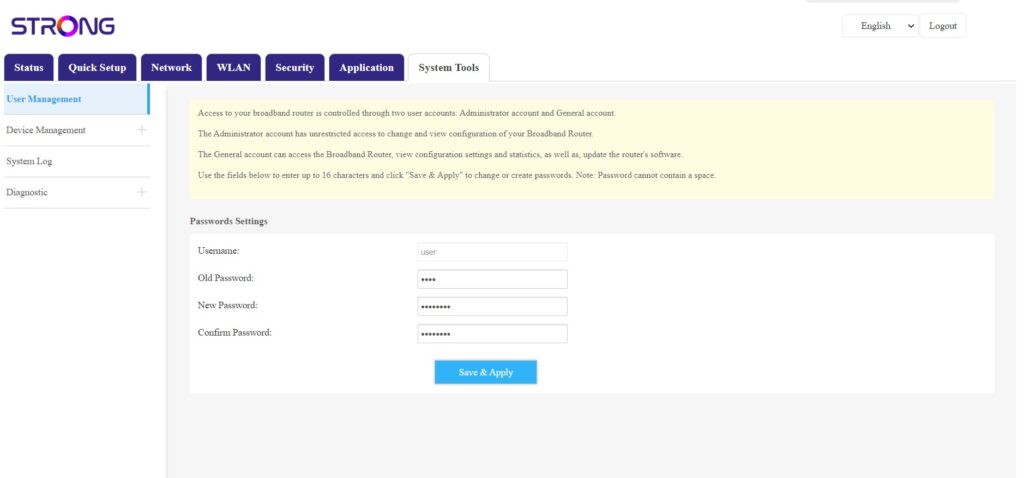
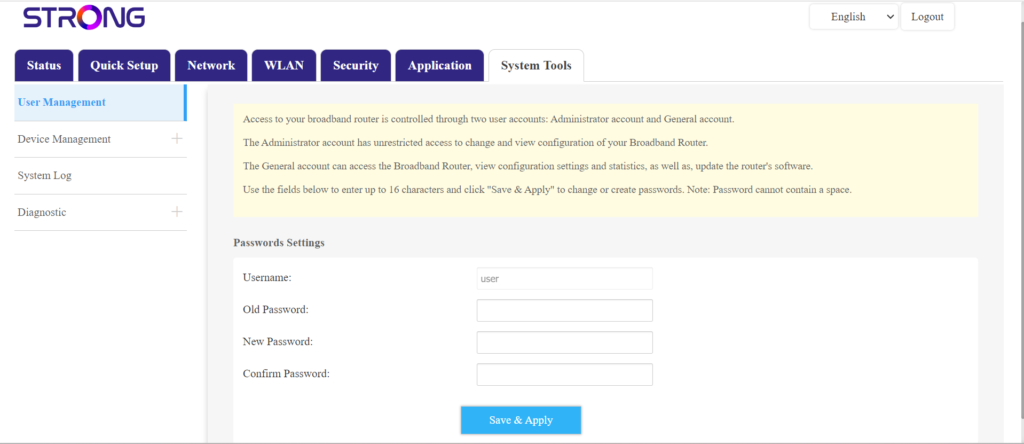
Μόλις ολοκληρωθεί αυτό, κάντε κλικ στις επιλογές «Εργαλεία συστήματος» και «Διαχείριση χρηστών»
5Αλλαγήκωδικού πρόσβασης
Συμπληρώστε τα παρακάτω στοιχεία στα αντίστοιχα πεδία πριν κάνετε κλικ στο «Αποθήκευση & Εφαρμογή»:
- Παλαιός κωδικός πρόσβασης: Εισαγάγετε τον τρέχοντα κωδικό πρόσβασης που χρησιμοποιήσατε για να συνδεθείτε στο περιβάλλον χρήστη του ιστού.
- Νέος κωδικός πρόσβασης: Εισαγάγετε έναν νέο κωδικό πρόσβασης για να συνδεθείτε στο περιβάλλον εργασίας χρήστη (Web UI).
- Επιβεβαίωση κωδικού πρόσβασης: Πληκτρολογήστε τον ίδιο κωδικό πρόσβασης με αυτόν που έχετε εισάγει στο πεδίο «Νέος κωδικός πρόσβασης».