
Point d'accès Wi-Fi 4G+ AIRSPOT 510
Aucun élément n'a été trouvé.
Aucun élément n'a été trouvé.
Toutes les questions
Point d'accès Wi-Fi 4G+ AIRSPOT 510
Aucun élément n'a été trouvé.
Aucun élément n'a été trouvé.
Quel type de carte SIM puis-je utiliser dans mon routeur ?
Une carte SIM nano doit être insérée dans le logement pour carte SIM du 4G PORTABLE HOTSPOT 900 avant de mettre l'appareil sous tension.
Suivez les étapes indiquées dans l'illustration ci-dessous :
- Prenez votre carte SIM nano.
- Retirez le capot arrière pour accéder à la batterie, puis retirez celle-ci.
- Insérez la carte SIM.
- Installez la batterie, le capot arrière et l’ switch ur l’appareil.
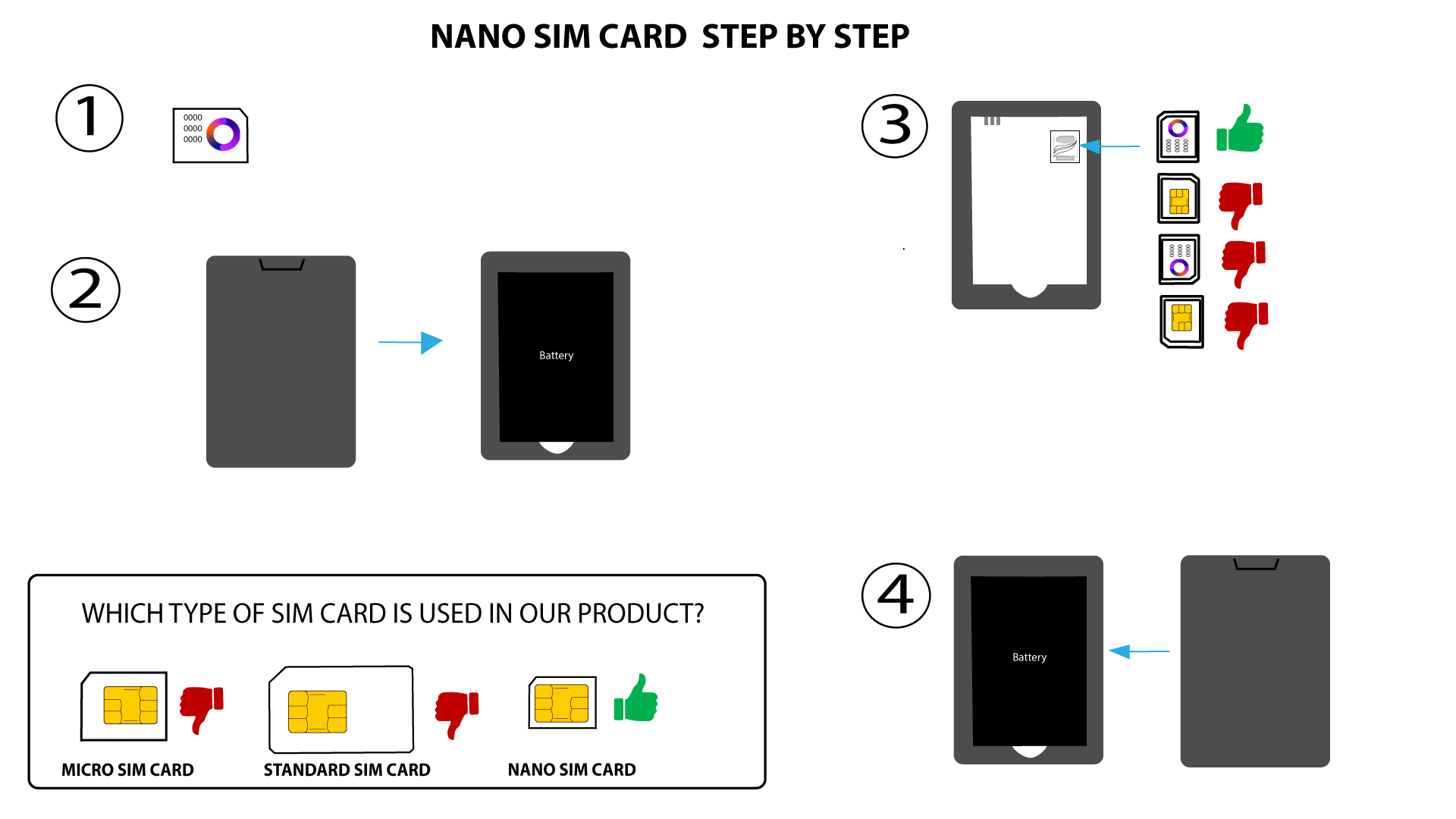

AVERTISSEMENT : Si votre carte SIM n'est pas détectée par l'appareil, vérifiez qu'elle est bien insérée dans le bon sens. Si vous utilisez un adaptateur, assurez-vous qu'il est bien enfoncé.