4G AIRHOME 310 levehető 4G antennákkal
Nem találtunk tárgyakat.
Nem találtunk tárgyakat.
Minden kérdés
4G AIRHOME 310 levehető 4G antennákkal
Nem találtunk tárgyakat.
Nem találtunk tárgyakat.
Mit tudok csinálni a webes felhasználói felületen?
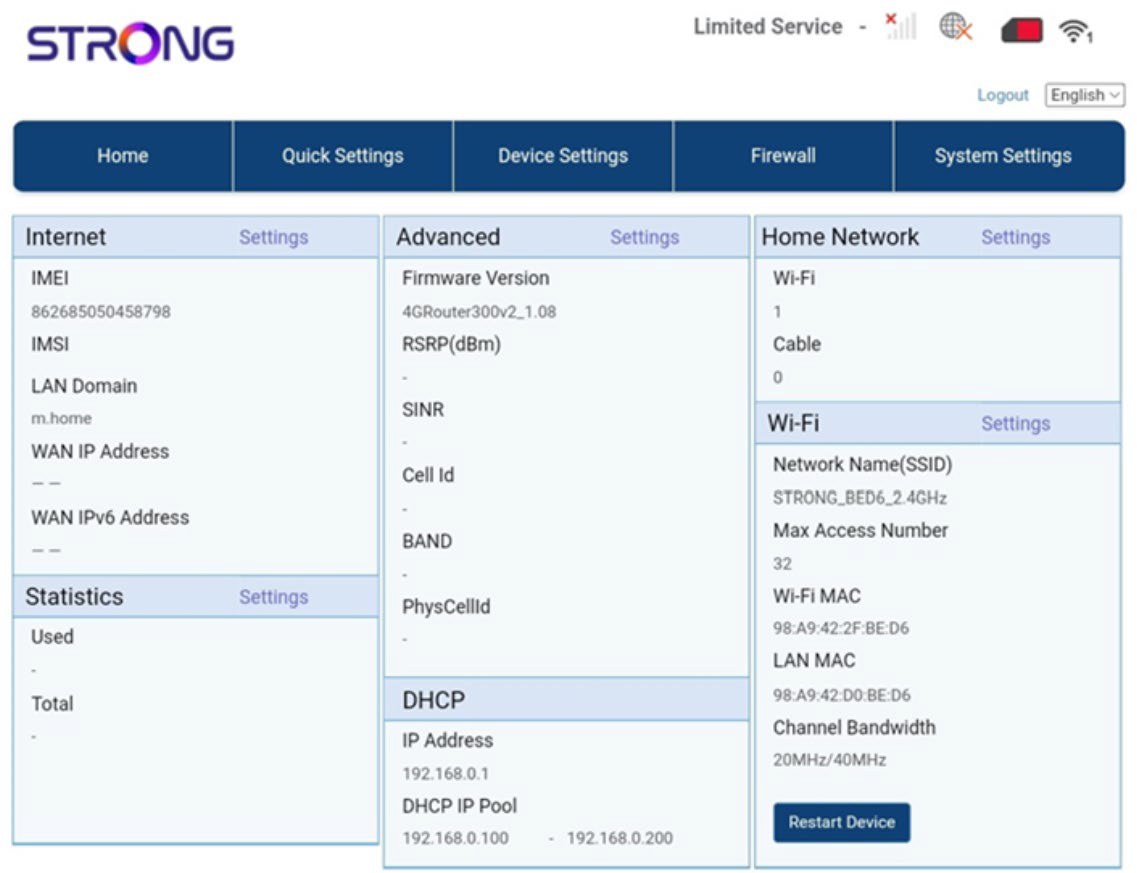
A webes felhasználói felület 5 szakaszra oszlik:
• Főoldal: itt láthatók a routerrel kapcsolatos legfontosabb adatok, például az internetkapcsolat állapota, a firmware-verzió, az IP-cím, a Wi-Fi-hálózatra és az otthoni hálózatra vonatkozó információk stb.
• Gyorsbeállítások: itt szerkesztheti az SSID-t és a jelszót.
• Eszközbeállítások: itt láthatja a csatlakoztatott eszközök számát, kezelheti az IP-cím beállításait, a PIN-kódokat, az antenna-beállításokat, a Wi-Fi-beállításokat, az internetbeállításokat stb.
• Tűzfal: itt állíthatja be a biztonsági paramétereket.
• Rendszerbeállítások: itt frissítheti, újraindíthatja vagy szerkesztheti a beállításait.
Ezen felül megtekintheti a Wi-Fi-hálózat, a mobilhálózat és az adatforgalom állapotát is.