
4G AIRHOME 310 levehető 4G antennákkal
Nem találtunk tárgyakat.
Nem találtunk tárgyakat.
Minden kérdés
4G AIRHOME 310 levehető 4G antennákkal
Nem találtunk tárgyakat.
Nem találtunk tárgyakat.
Mit jelentenek a webes felhasználói felületen megjelenő különböző SIM-kártya állapotok?

Mielőtt csatlakozna a webes felhasználói felülethez, győződjön meg arról, hogy a SIM-kártya megfelelően van-e behelyezve, és hogy megadta-e a PIN-kódot.
A webes felhasználói felületen belépve láthatja, hogy a SIM-kártya állapotának sorában többféle állapot is megjelenhet:
• Érvénytelen SIM-kártya: A SIM-kártya be van helyezve és a rendszer felismeri, de a PIN-kód miatt nem működik.
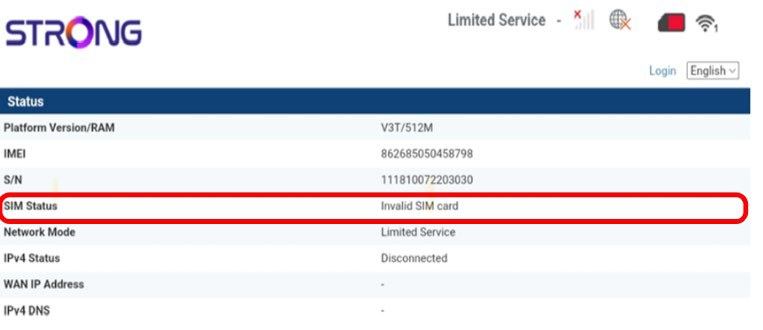
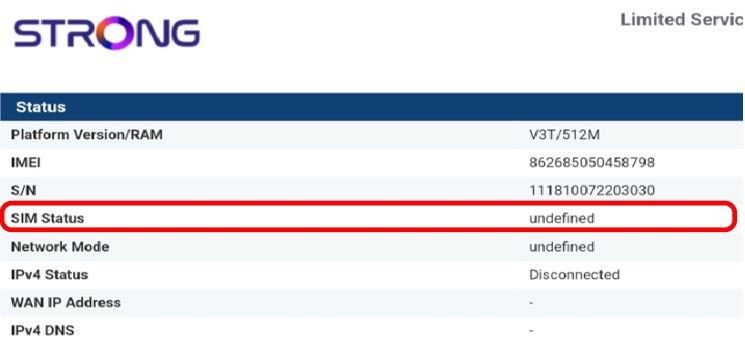
Ismeretlen hiba: A készülék nem ismeri fel megfelelően a SIM-kártyát, mert az nincs helyesen behelyezve.
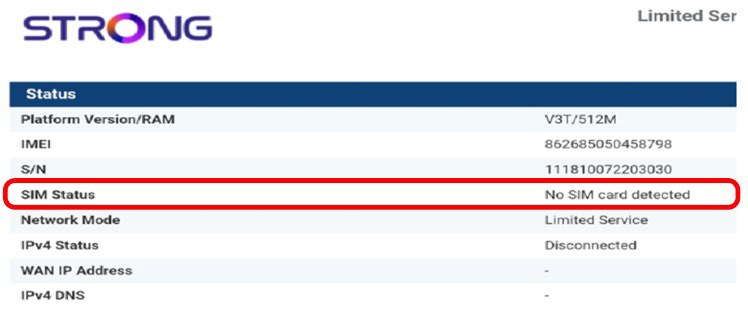
Nem észlelt SIM-kártyát: A SIM-kártya nincs megfelelően behelyezve a készülékbe, vagy nincs SIM-kártya a nyílásban.
- Ha a SIM-kártya PIN-kóddal van zárolva, akkor be kell jelentkeznie a webes felhasználói felületre, hogy beírja a kódot, és feloldja a SIM-kártyát.
- Ha a rendszer nem ismeri fel a SIM-kártyát, kérjük, ellenőrizze, hogy a SIM-kártya a nyílásba helyezve nem látszik-e az arany színű oldala.
- Ha a SIM-kártya nincs megfelelően behelyezve, helyezze vissza a nyílásba, és ellenőrizze, hogy a SIM-kártya még mindig az adapterben van-e.