Mesh Wi-Fi 5 ATRIA 2100 UK add-on)
Nessun articolo trovato.
Nessun articolo trovato.
Tutte le domande
Mesh Wi-Fi 5 ATRIA 2100 UK add-on)
Nessun articolo trovato.
Nessun articolo trovato.
Come si usa l'app Atria " Mesh "?
1App Atria“ Mesh ”
Quindi scarica l'app Atria “ Mesh ”.

2. Connettitial Wi-Fi
Per farlo, connettiti alla rete Wi-Fi del dispositivo Mesh collegato al tuo router/modem.

3. Titoli di studio
Inserisci il nome utente e la password (admin/admin) per effettuare l'accesso.

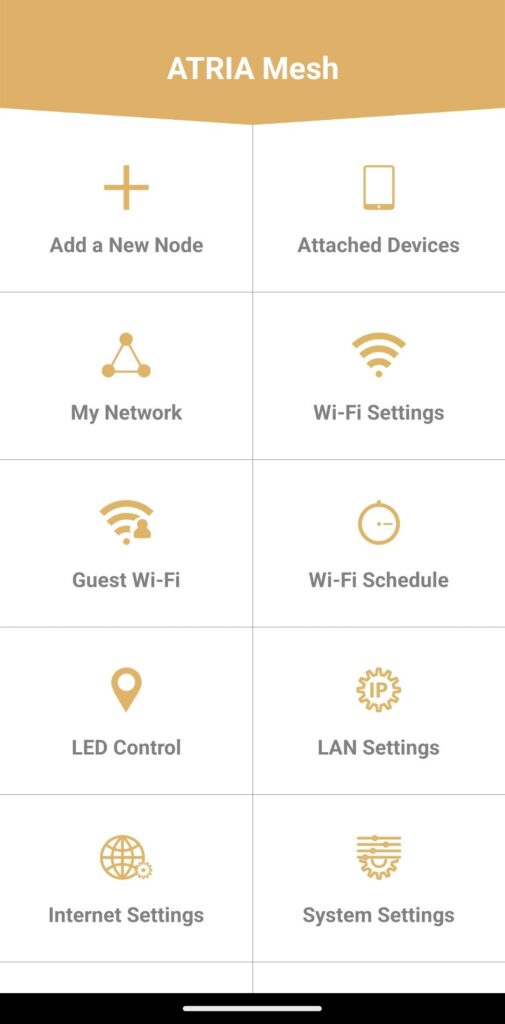
4Pagina principale
Ora ti trovi nella pagina principale.
- Aggiungi un nuovo nodo: qui puoi aggiungere una nuova unità Mesh alla tua rete Mesh .
- Dispositivi collegati: qui puoi verificare quali dispositivi sono collegati alla tua rete Mesh .
- La mia rete: qui puoi visualizzare tutte le unità Mesh collegate alla tua rete Mesh .
- Impostazioni Wi-Fi: qui puoi modificare l'SSID (nome della rete Wi-Fi) e la password della tua rete Wi-Fi Mesh .
- Wi-Fi per gli ospiti: qui puoi impostare e configurare una rete Wi-Fi per gli ospiti a 2,4 GHz o a 5 GHz.
- Programma Wi-Fi: qui puoi impostare un intervallo di tempo per l’attivazione della tua rete Wi-Fi.
- Controllo LED: da qui è possibile accendere o spegnere i LED dell'unità " Mesh ".
- Impostazioni LAN: qui è possibile abilitare o disabilitare il DHCP.
- Impostazioni Internet: qui è possibile configurare una connessione DHCP, un DNS manuale, una connessione PPPoE e impostare un indirizzo IP statico.
- Impostazioni di sistema: qui è possibile modificare il nome utente e la password dell'amministratore per accedere all'app.