
4G AIRHOME 200 Mini-router met afneembare 4G-antennes
Alle vragen
4G AIRHOME 200 Mini-router met afneembare 4G-antennes
Hoe kan ik de APN-instellingen van mijn provider controleren en aanpassen?
Als je simkaart niet automatisch door het apparaat wordt herkend, moet je inloggen op de webinterface om de APN-instellingen te controleren en deze indien nodig aan te passen. De APN-instellingen van je provider kun je rechtstreeks op hun website vinden via
, of je kunt deze opvragen bij de klantenservice van je provider.
1. Maak verbindingmet het wifi-netwerk van je router
U moet verbinding maken met de webinterface. Voer hiervoor de SSID (naam van het wifi-netwerk) en het wifi-wachtwoord van de router in op uw apparaat.

2. Ganaar het IP-adres van de webinterface
Voer vervolgens het volgende IP-adres in je browser in: 192.168.188.1

3Voeruw inloggegevens in
U moet het wachtwoord invoeren. Klik vervolgens op ‘Inloggen’.

4Netwerkinstellingen
Klik op ‘Netwerkinstellingen’.

5Zoekde APN-gegevens van je provider op
Zoek de APN-instellingen op de website van je provider. Je moet de volgende gegevens noteren:
- Naam
- APN
- Gebruikersnaam
- Wachtwoord
- Authenticatie
6. Maakeen APN met de naam „ Gebruiksaanwijzing ” aan
Als de gegevens niet kloppen, klik dan op APN en vervolgens op Gebruiksaanwijzing op ‘Nieuw toevoegen’.
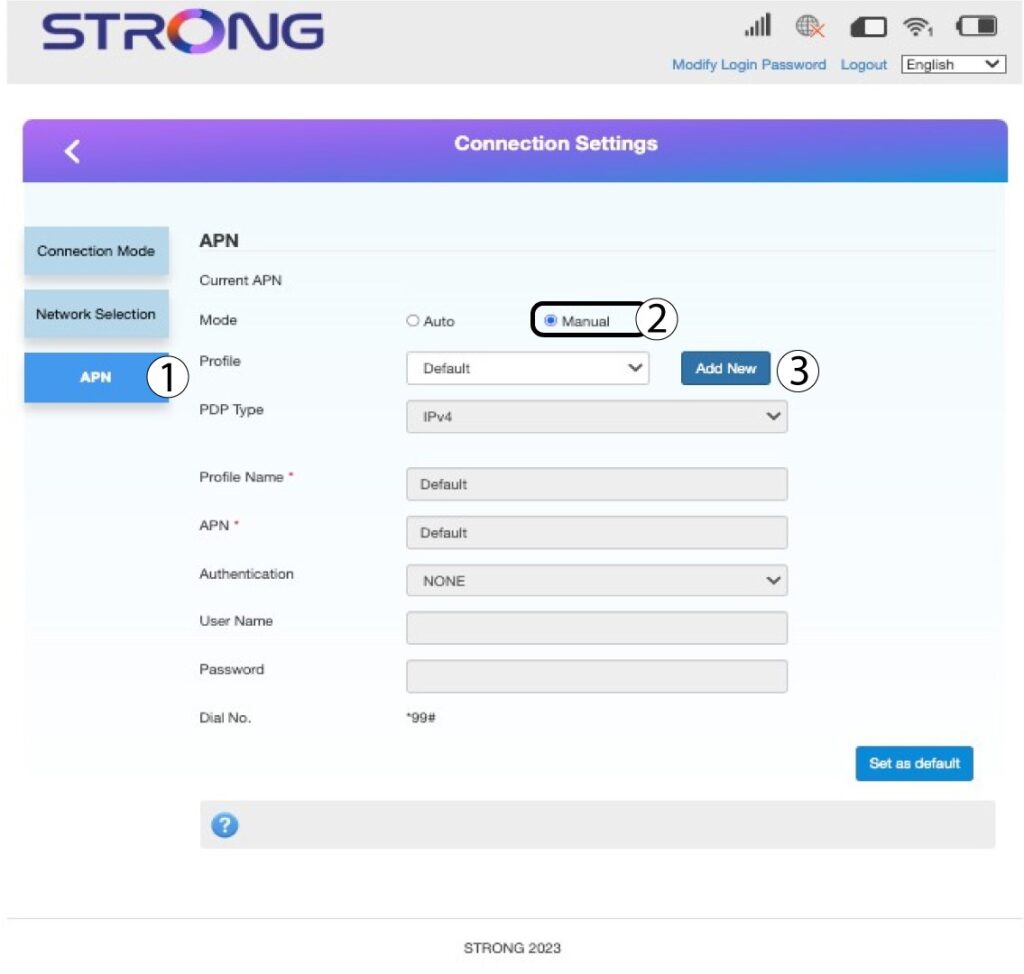
7. Voerde APN-gegevens in
Voer de volgende gegevens in voordat je op ‘Als standaard instellen’ klikt:
- PDP-type: selecteer ‘IPv4’ als waarde voor het PDP-type.
- Naam in profiel: voer de naam van uw serviceprovider in.
- APN: voer het APN-adres in.
- Authenticatietype: Selecteer het authenticatietype dat door uw provider voor uw APN is gedefinieerd uit de volgende opties (NONE, CHAP, PAP)
