ATRIA Wi-Fi 6 Mesh 3000 UK 2-pack)
Alle vragen
ATRIA Wi-Fi 6 Mesh 3000 UK 2-pack)
Hoe gebruik ik de Atria-app ‘ Mesh ’?
Hoe gebruik ik de AtriaMesh-app?
1Maak verbindingmet het wifi-netwerk van het apparaat
Download de smartphone-app„ATRIA MESH “ in de App Store of de Google Play Store.

2. Ganaar het IP-adres van de webinterface
Vervolgens moet je met je smartphone verbinding maken met het wifi-netwerk van de Mesh en je vervolgens aanmelden bij de app met je inloggegevens, die„admin” en„admin” zouden moeten zijn als je deze niet hebt gewijzigd.

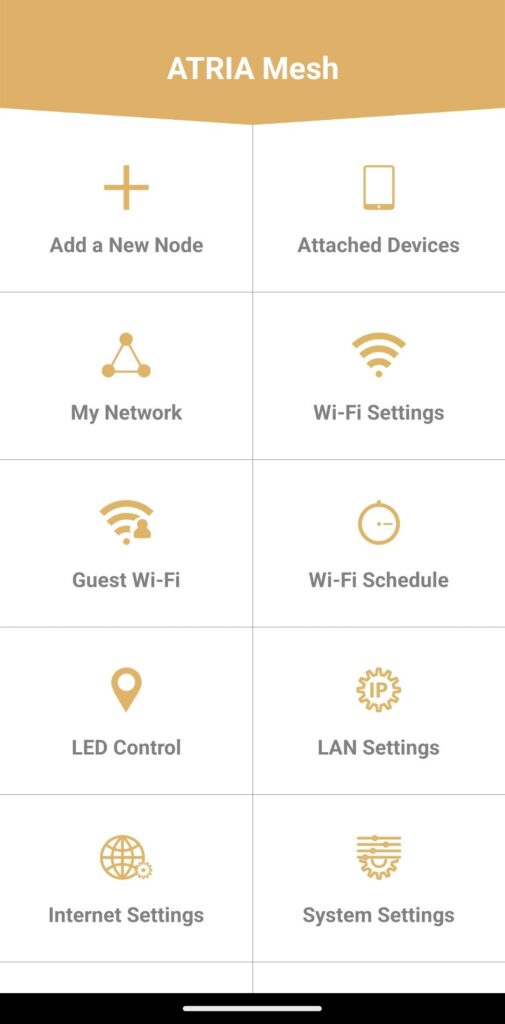
3Hoofdmenu
Je bevindt je nu op de hoofdpagina.
• Een nieuw knooppunt toevoegen: Hier kunt u een nieuw Mesh -apparaat toevoegen aan uw Mesh -netwerk.
• Aangesloten apparaten: Hier kunt u controleren welke apparaten zijn aangesloten op uw Mesh -netwerk.
• Mijn netwerk: Hier kunt u alle Mesh -apparaten bekijken die zijn aangesloten op uw Mesh -netwerk.
• Wi-Fi-instellingen: Hier kunt u de SSID (Wi-Fi-netwerknaam) en het wachtwoord van uw Wi-Fi Mesh -netwerk bewerken en aanpassen.
• Gast-wifi: Hier kunt u een 2,4 GHz- of 5 GHz-gast-wifi instellen en configureren.
• Wifi-schema: Hier kunt u een tijdsperiode instellen waarin uw wifi-netwerk actief is.
• LED-bediening: Hier kunt u de LED’s van uw Mesh -apparaat in- of uitschakelen.
• LAN-instellingen: Hier kunt u DHCP in- of uitschakelen.
• Internetinstellingen: Hier kunt u een DHCP-verbinding, een Gebruiksaanwijzing DNS, een PPPoE configureren en een statisch IP-adres instellen.
• Systeeminstellingen: Hier kunt u de gebruikersnaam en het wachtwoord van de beheerder wijzigen om toegang te krijgen tot de app.