
Dubbelband-repeater 1200
Alle vragen
Dubbelband-repeater 1200
Ik krijg geen toegang tot de webinterface (http://setup.strong) nadat ik mijn repeater heb ingesteld. Hoe komt dat?

Waarschuwing: Normaal gesproken kunt u na de installatie geen verbinding maken met de webinterface, omdat de verbindingsgegevens zijn gewijzigd. Er worden namelijk twee wifi-netwerken aangemaakt zodra de installatie is voltooid. U moet verbinding maken met een van deze netwerken om toegang te krijgen tot de webinterface.
Volg de onderstaande procedure om toegang te krijgen tot de webinterface.
1. Maak verbindingmet de repeater
Je moet verbinding maken met de repeater via RJ45 of verbinding maken met een van de wifi-netwerken die na de configuratie zijn aangemaakt.

2. Opende webinterface
Voer de URL in om de webinterface in je browser te openen

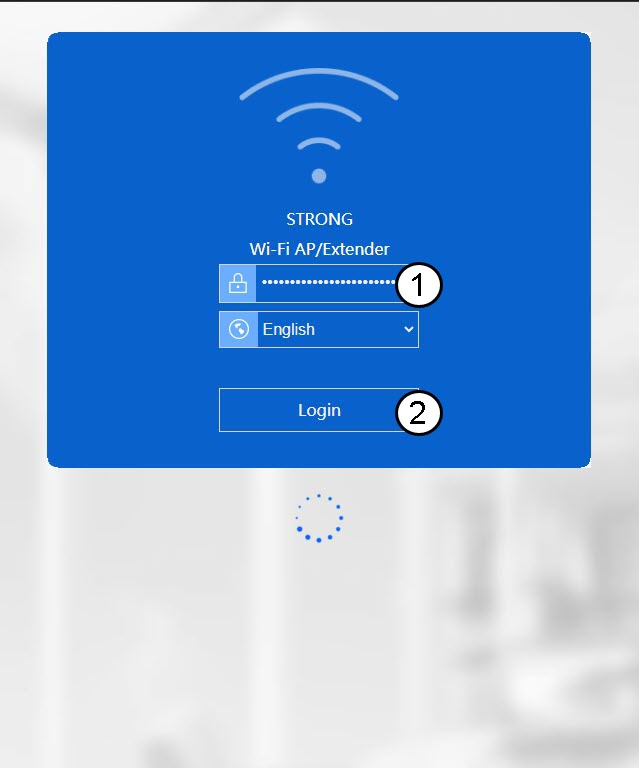
3. Login op de webinterface
Voer je wachtwoord in en klik op ‘Inloggen’.
4. Zoekhet IP-adres van de repeater op
Zoek in de apparaatgegevens naar het IP-adres van de repeater
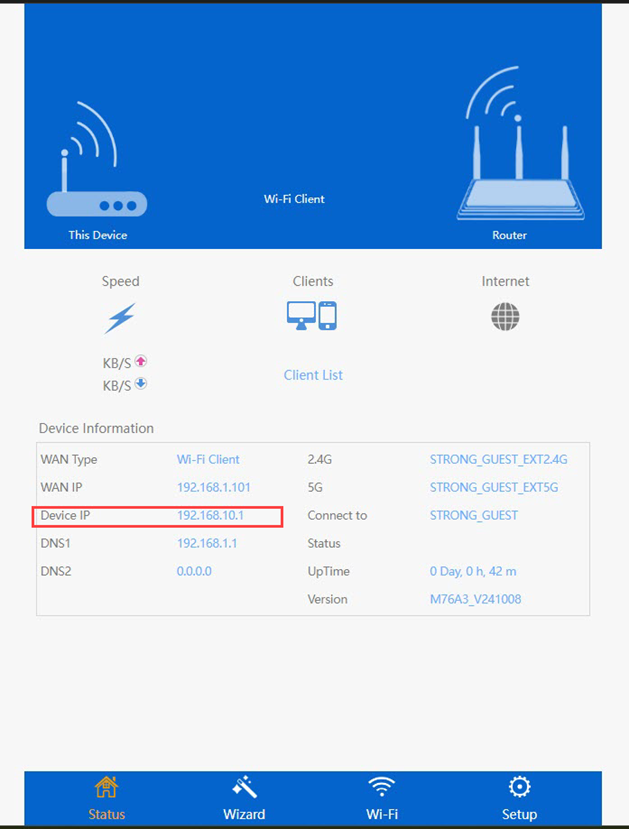
TIP: Het IP-adres van je repeater verandert zodra deze is geconfigureerd voor de wifi-host.