5G AIRHOME 1050 | Wi-Fi 6
Nie znaleziono żadnych elementów.
Nie znaleziono żadnych elementów.
Wszystkie pytania
5G AIRHOME 1050 | Wi-Fi 6
Nie znaleziono żadnych elementów.
Nie znaleziono żadnych elementów.
Jak zmienić hasło administratora?

Ostrzeżenie: należy pamiętać, że nie ma możliwości zmiany nazwy użytkownika administratora. Można zmienić jedynie hasło.
1. Podłączurządzenie
Aby zaktualizować hasło administratora, należy połączyć się z siecią Wi-Fi na swoim urządzeniu.

2. Wejdźdo interfejsu użytkownika (Web UI)
Następnie wpisz w przeglądarce następujący adres IP: 168.0.1.

3Zalogujsię
Należy wprowadzić nazwę użytkownika i hasło. Następnie należy kliknąć przycisk „Zaloguj się”.

4. Zarządzanie użytkownikami
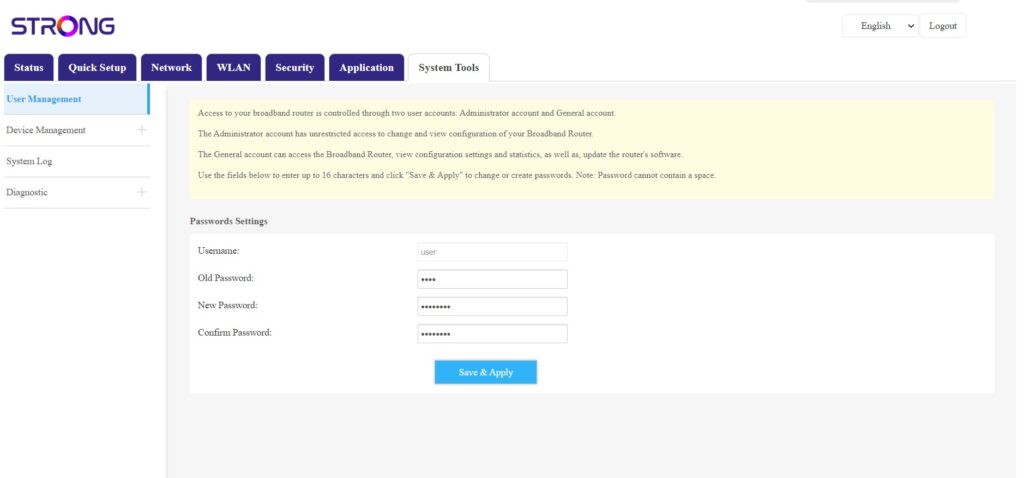
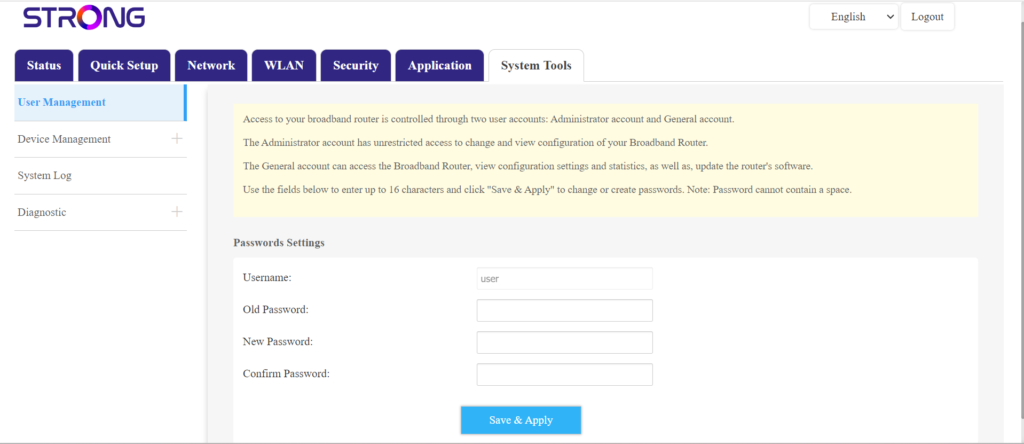
Gdy to zrobisz, kliknij „Narzędzia systemowe” i „Zarządzanie użytkownikami”
5. Zmieńhasło
Przed kliknięciem przycisku „Zapisz i zastosuj” wprowadź następujące informacje w odpowiednich polach:
- Stare hasło: Wprowadź aktualne hasło, którego używałeś do logowania się do interfejsu użytkownika.
- Nowe hasło: Wprowadź nowe hasło, aby zalogować się do interfejsu użytkownika.
- Potwierdzenie hasła: Wprowadź to samo hasło, co w polu „Nowe hasło”.