
4G+ AIRSPOT 510 Wi-Fi
Inga föremål hittades.
Inga föremål hittades.
Alla frågor
4G+ AIRSPOT 510 Wi-Fi
Inga föremål hittades.
Inga föremål hittades.
Hur ändrar jag administratörslösenordet?
1Öppnawebbgränssnittet
För att komma åt webbgränssnittet, se avsnittet ”Hur kommer jag åt webbgränssnittet?”.
2Gåtill lösenordsinställningarna
I avsnittet ”Administration ” klickar du på ”Systeminställningar ” och sedan på ”Ändra lösenord”.
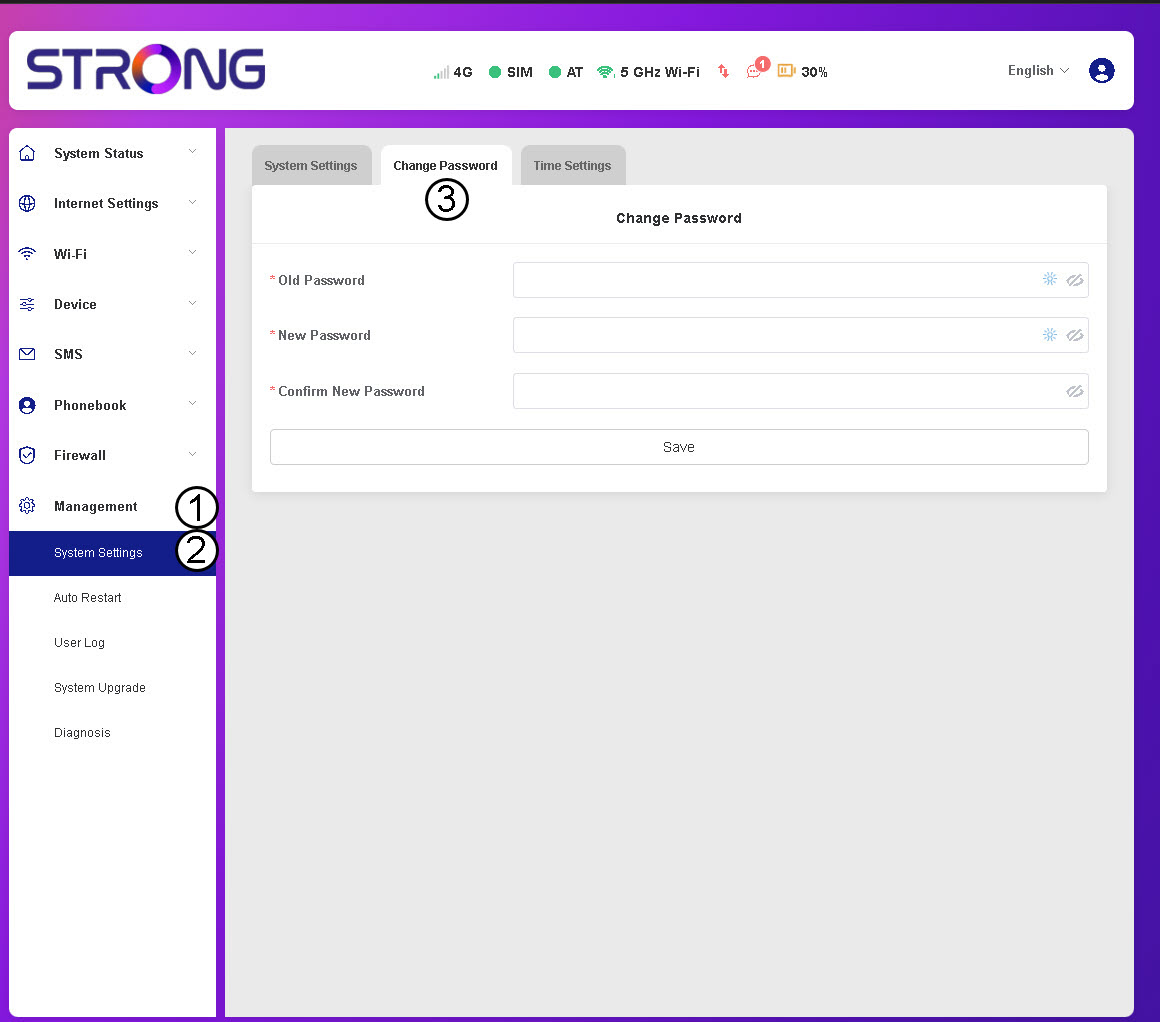
3Angelösenordsuppgifter
Ange sedan följande uppgifter innan du klickar på Spara:
- Gammal lösenord: Ange ditt nuvarande lösenord.
- Nytt lösenord: Ange ett lösenord som består av minst 8 tecken och innehåller en kombination av versaler, gemener, siffror och specialtecken. Endast följande specialtecken är tillåtna: @$%*&.
- Bekräfta nytt lösenord: Ange samma lösenord som i fältet ovan.


VARNING: Om du har glömt ditt nuvarande lösenord måste du återställa enheten till fabriksinställningarna.