
4G AIRHOME 200 Mini-router med avtagbara 4G-antenner
Alla frågor
4G AIRHOME 200 Mini-router med avtagbara 4G-antenner
Hur kontrollerar och redigerar jag APN-inställningarna för min operatör?
Om enheten inte automatiskt känner igen ditt SIM-kort måste du logga in på webbgränssnittet för att kontrollera APN-inställningarna och ändra dem vid behov. Din operatörs APN-inställningar finns direkt på deras webbplats,
, eller så kan du begära dem från din operatörs supporttjänst.
1. Ansluttill routerns Wi-Fi-nätverk
Du måste ansluta till webbgränssnittet. För att göra det anger du routerns SSID (Wi-Fi-nätverksnamn) och Wi-Fi-lösenord på din enhet.

2. Gåtill webbgränssnittets IP-adress
Ange sedan följande IP-adress i din webbläsare: 192.168.188.1

3Angedina inloggningsuppgifter
Du måste ange lösenordet. Klicka sedan på ”Logga in”.

4Nätverksinställningar
Klicka på ”Nätverksinställningar”.

5. Sök efterAPN-uppgifterna hos din operatör
Leta efter APN-inställningarna på din operatörs webbplats. Du måste anteckna följande uppgifter:
- Namn
- APN
- Användarnamn
- Lösenord
- Autentisering
6Skapaen APN med namnet ” manual ”
Om uppgifterna är felaktiga, klicka på APN och sedan på Manual på Lägg till ny.
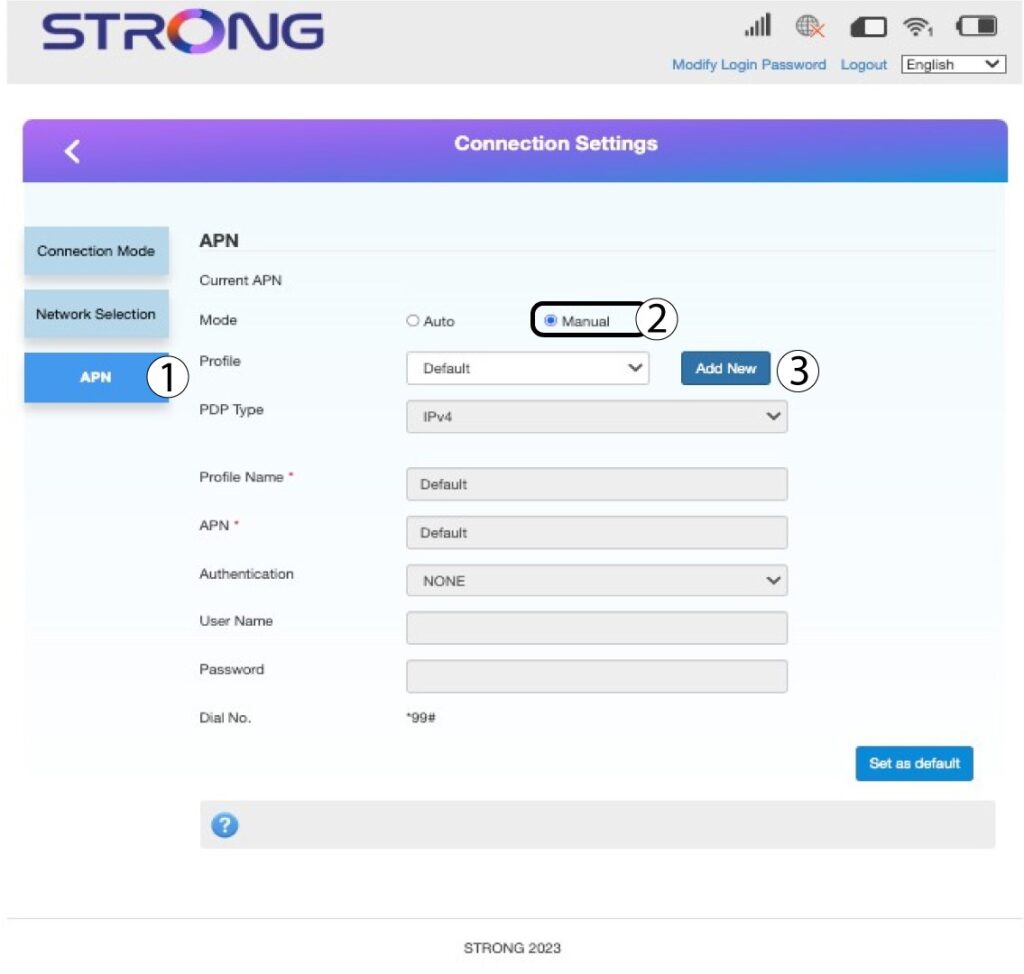
7AngeAPN-uppgifterna
Ange följande uppgifter innan du klickar på ”Ange som standard”:
- PDP-typ: Välj IPv4 som värde för PDP-typ.
- Profilnamn: Ange namnet på din tjänsteleverantör.
- APN: Ange APN-adressen.
- Autentiseringstyp: Välj den autentiseringstyp som din leverantör har definierat för ditt APN bland följande alternativ (NONE, CHAP, PAP)
