
Wi-Fi 4G+ AIRSPOT 510
Нічого не знайдено.
Нічого не знайдено.
Усі питання
Wi-Fi 4G+ AIRSPOT 510
Нічого не знайдено.
Нічого не знайдено.
Як змінити пароль адміністратора?
1. Увійтив веб-інтерфейс користувача
Щоб отримати доступ до веб-інтерфейсу, див. розділ «Як отримати доступ до веб-інтерфейсу?».
2Перейдітьдо розділу «Налаштування пароля»
У розділі «Управління » натисніть «Налаштування системи » та «Змінити пароль».
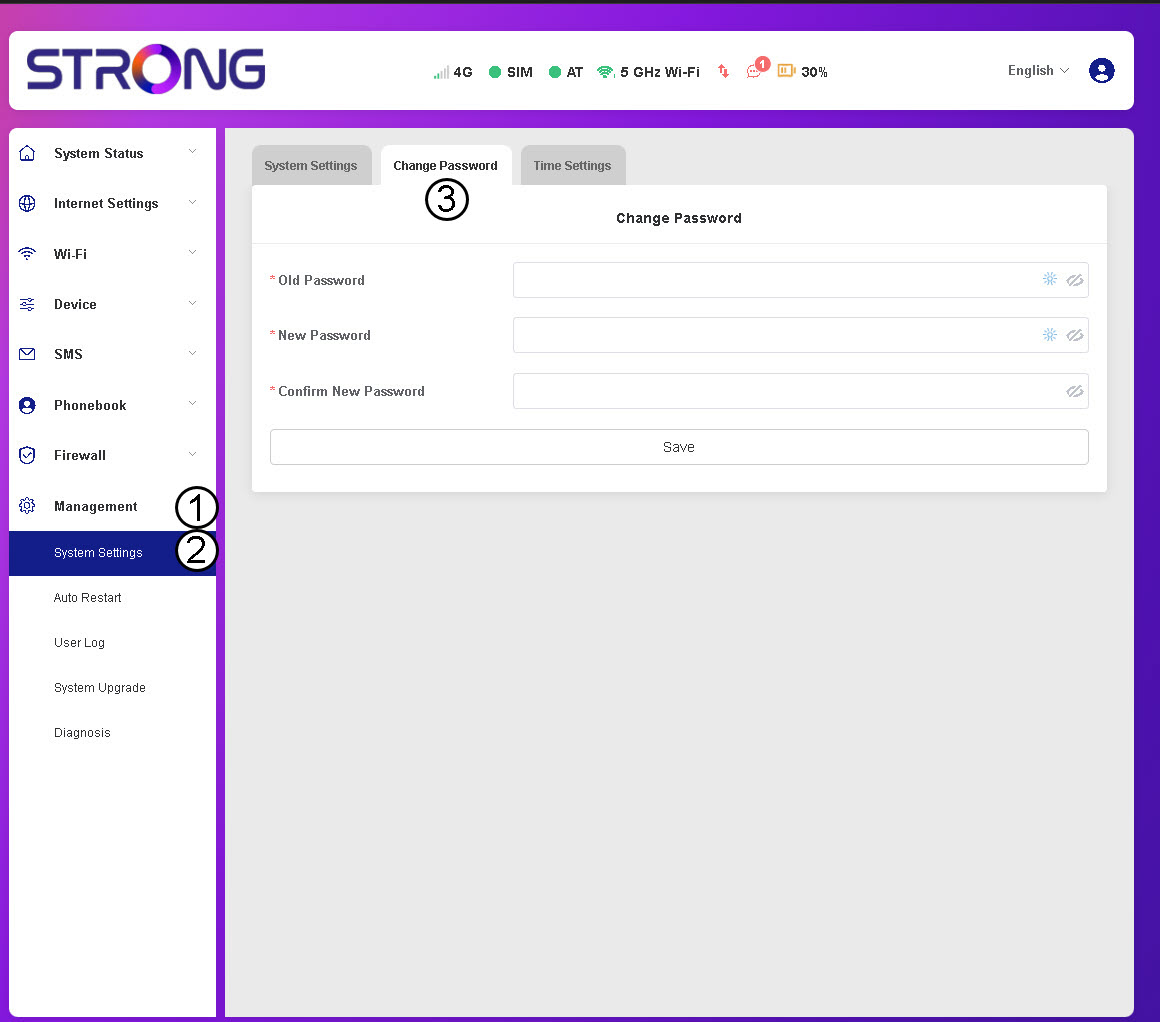
3. Введітьдані пароля
Потім введіть наведену нижче інформацію, а потім натисніть «Зберегти»:
- Старий пароль: Введіть свій поточний пароль.
- Новий пароль: Введіть пароль, що складається щонайменше з 8 символів і містить поєднання великих літер, малих літер, цифр та спеціальних символів. Допускаються лише такі спеціальні символи: @$%*&.
- Підтвердьте новий пароль: введіть той самий пароль, що й у попередньому полі.


УВАГА: Якщо ви забули свій поточний пароль, вам доведеться скинути налаштування пристрою до заводських.